Agentflow started as a scheduler built around my own way of working. It knew about the provider tools, model routes, local folders and skills I used. That made it useful on my machine, but awkward for anybody else to pick up and use.
Before publishing it, I separated the reusable scheduler from the configuration and runtime data which made it specific to me. Agentflow is now public on GitHub, with an installable 0.0.2 prerelease.
If you want to get hands-on, skip to the installation commands. This is the fourth article in the series; the earlier posts cover the original coding-agent scheduler, durable task state with Beads and the persistent controller.
Preparing my internal tool for other users
I started the public release in a new, clean repository. Every file moved across had to be useful to somebody installing Agentflow on another machine. The CLI, controller, generic skills, provider adapters, schemas, tests and documentation stayed. My credentials, session transcripts, provider logs, Beads database and live controller state did not.
The code also needed to stop assuming that my paths and provider setup existed. Agentflow now creates project configuration where it is installed, keeps runtime data out of Git and lets each user choose their own model routes and project skills. Provider instructions and hooks are installed as managed assets instead of links back to my development checkout.
I checked the packaged wheel and source archive as well as the repository. If you see saintdle-agentflow in the installation output, that is the Python distribution name; the command, import and repository are all named agentflow.
Most of the implementation was built with AI assistance, and that is documented in the repository. It still needs the same human review as any other development tool which can edit a working copy or launch another process.
Making the package public also meant moving my own installation away from the private development checkout. The migration path is for this situation: it finds Agentflow-managed links and provider files left by an older installation, shows the proposed changes, takes a backup and keeps enough information to roll back. It does not replace unrelated skills, profiles or hooks.
A new installation does not need that migration. agentflow install --dry-run shows which provider assets it would add and where they will go. The live command creates missing or Agentflow-managed files, and leaves existing custom files for you to review.
What you are installing
Once installed, Agentflow coordinates work held in one approved Beads graph. Beads records the tasks, dependencies and evidence. The Agentflow controller takes the next ready task, checks the workspace and provider route, then opens a bounded Codex, Claude Code or GitHub Copilot CLI session. When that session finishes, the controller checks the returned result before updating the graph.
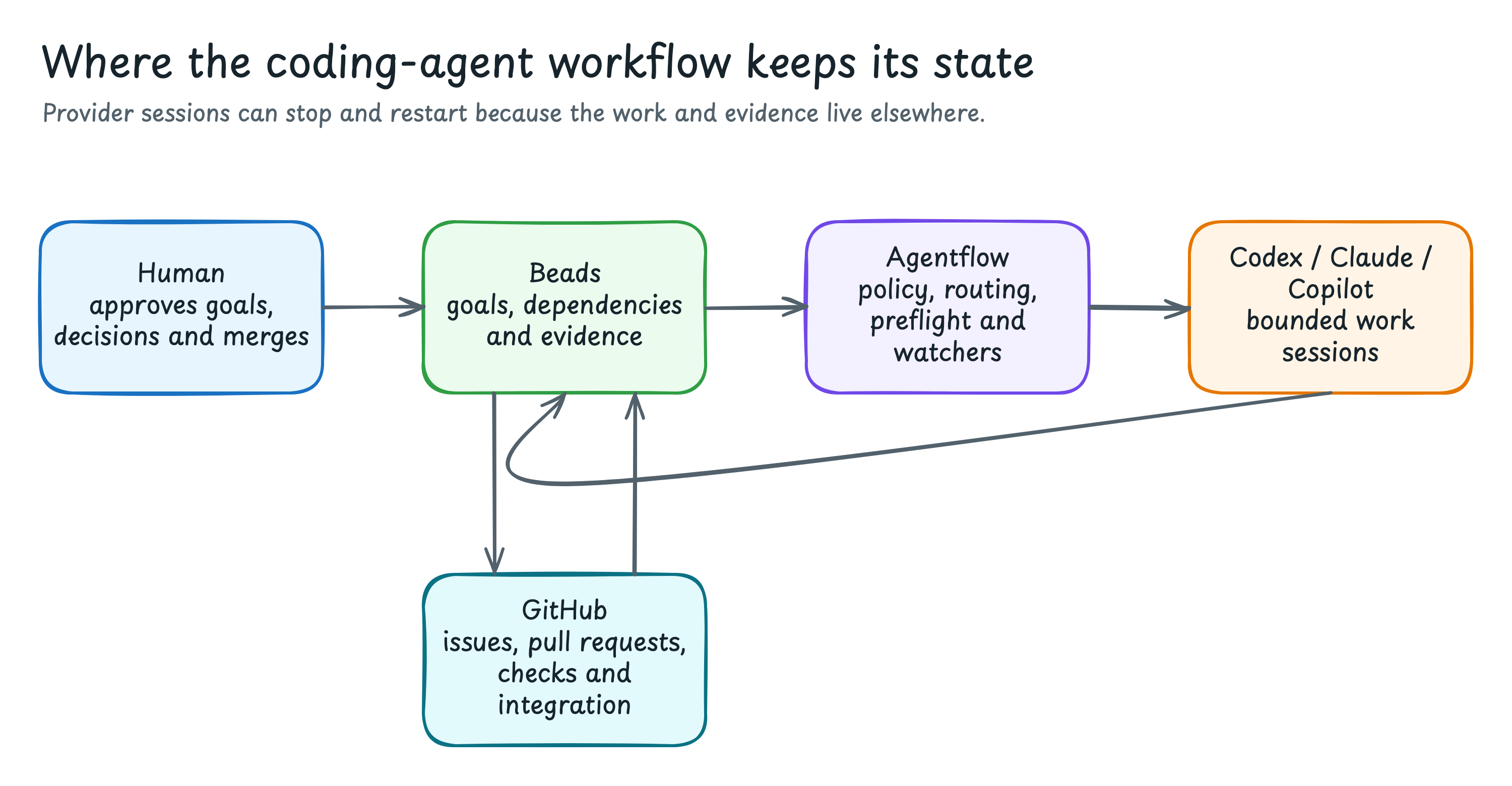
The controller handles the copy-and-paste work described in the persistent-controller article, but it does not give a provider control of the whole project. Goal approval, exceptions and merge decisions remain with the user.
The bundled model policy uses exact routes. Sol handles Codex controller and review work, while Luna handles coding and exploration. Approved Opus and Sonnet routes cover Claude Code and Copilot. An unavailable, generic or disallowed model stops at preflight instead of being replaced automatically. The generated .agentflow/models-v1.json file contains the exact names and effort levels to review before a launch.
Install Agentflow 0.0.2
You need:
- Python 3.10 or later on macOS or Linux;
- Git for a Git-backed project;
- Beads 1.1 or later, with
bdon yourPATH; and - at least one provider CLI: Codex, Claude Code or GitHub Copilot CLI.
On macOS, install Beads with Homebrew:
brew install beads
bd --version
Use the Beads installation instructions for other supported methods.
Agentflow is not on PyPI yet. Install the tagged GitHub release with uv:
uv tool install "git+https://github.com/saintdle/agentflow.git@v0.0.2"Or with pipx:
pipx install "git+https://github.com/saintdle/agentflow.git@v0.0.2"Check the command and local tools:
agentflow --version
agentflow doctor
bd --version
doctor reports what it found without reading out credentials. It cannot confirm that your provider account can use a particular model.
Now inspect and install the bundled skills, provider profiles and Codex lifecycle hook:
agentflow install --dry-run
agentflow install
agentflow skills doctor
Read the dry-run output before applying it, especially on a machine which already has custom provider configuration. The installation guide also covers downloaded wheels, upgrades and migration from an older checkout.
Initialise a project
I tested this path in an empty Git repository with Beads 1.1. Agentflow reported every file it created, initialised Beads in local embedded mode and left the runtime directories ignored.
cd /path/to/your-project
agentflow init . --beads
agentflow beads status .
agentflow doctor
git status --short
On a new repository, the important files look like this:
your-project/
├── AGENTS.md
├── CLAUDE.md
├── .claude/
│   └── settings.json
├── .github/
│   ├── copilot-instructions.md
│   └── hooks/
│       └── agentflow.json
├── .agentflow/
│   ├── config.json
│   └── models-v1.json
├── .beads/
│   ├── PRIME.md
│   └── formulas/
│       └── agentflow-controlled-rework.formula.toml
└── .gitignore
In this layout:
AGENTS.md,CLAUDE.mdand the Copilot instructions point each provider at the repository’s rules;- the Claude and Copilot hook files connect their normal lifecycle to Agentflow without replacing custom hooks;
.agentflow/config.jsonandmodels-v1.jsonhold project configuration, registered skills and allowed model routes; and.beads/holds the local workflow graph, while.gitignorekeeps controller state, handoffs, logs and machine-local configuration out of commits.
Initialisation creates missing files and preserves existing instructions or hooks for manual review. Beads defaults to local state. Only change that when you have deliberately chosen a tracked or shared collaboration model.
Let a coding-agent chat handle setup
The repository includes an agent-led setup guide for a ChatGPT/Codex or Claude session with terminal access. Paste this into a chat opened at the target repository:
Set up Agentflow for the repository open in this workspace.

Read AGENT_SETUP.md and the linked installation and migration guides from
https://github.com/saintdle/agentflow before changing anything. Install the
explicit v0.0.2 tag in an isolated tool environment. Run the redacted health
checks and preview provider assets before applying them. Preserve unmanaged
instructions, hooks, profiles and skills. Initialise local Beads state only if
this workspace does not already have it.

Do not create a work graph or launch agents. Return the Agentflow version,
command path, discovered providers, files changed and anything I need to fix.
Do not display credentials or transcript content.
I would still run the manual setup once in a disposable repository. It is easier to judge a chat-led migration after seeing which files a clean install normally creates.
Plan first, then approve a run
Start with a small task which has one clear output and a validation command you trust. Ask Agentflow to create the graph without launching a worker:
Use Agentflow to turn this request into a measurable goal and persist a Beads
root with bounded child tasks, dependencies, owners, acceptance evidence,
model routes, permissions and validation commands:

[describe the small change]

Do not claim tasks, launch providers, start Herdr or edit project files.
Explain the proposed graph and what needs my approval.
Read the graph before approving it. Check the file ownership, model route, validation commands and actions which remain outside the controller’s permissions.
When the graph is correct, use the root identifier returned by the planning step:
I approve Agentflow workflow root [root-id]. Start or resume its persistent
controller and continue through implementation, result collection, independent
review and deterministic validation.

You may edit only the approved files and create local commits. Do not push,
merge, publish, deploy or widen the scope. Stop at GOAL_COMPLETE,
USER_ACTION_REQUIRED, a durable blocker which needs my decision, or the agreed
deadline. Report the evidence and remaining risks in plain English.
The chat-first guide includes separate prompts for resume, read-only status and pull-request delivery. The first workflow tutorial shows the equivalent commands, including how to inspect a halted controller.
Add project knowledge before real work
The bundled skills cover the Agentflow process, not the build and review rules for your application. Keep those instructions with the project and register the skill:
agentflow skills add ./skills/my-domain-skill
agentflow skills sync
agentflow skills list
agentflow skills doctor
Agentflow hashes the selected skill package and its explicit local dependencies. A change after preflight stops the launch so the worker does not receive instructions different from the reviewed package.
The 0.0.2 core CLI supports macOS and Linux; Windows is unsupported. Hardened subprocess isolation uses macOS sandbox-exec and only applies to the synchronous agentflow isolation launch path. Linux has no equivalent Agentflow isolation backend in this release, and persistent Herdr/controller launches reject hardened profiles.
I have verified the package, clean installation, local suite and named hosted checks. Recovery after machine sleep, interrupted providers and repeated controller takeover still needs more live use. I also do not have enough comparable runs to claim an improvement in speed, output quality or cost.
Try the preview in a disposable repository, keep push and merge out of the first permission boundary, and inspect the Beads graph and Git diff before giving it more work. Reproducible setup problems can be filed in the Agentflow issue tracker.
Agentflow 0.0.2 and the linked instructions were checked on 4 August 2026. Provider model names and command behaviour can change, so check the current release notes and --help output before adapting these examples.