
The Issue
Yep, I forgot my password. So I followed the official documentation to reset my local admin password.
- SSH to your vRLI appliance (primary node if it's a cluster), as the root user
- Run this script which will output a new password
li-reset-admin-passwd.sh
The issue continued, after I was presented the new password, I still couldn't login!
The Cause
Essentially after several failed attempts to remember my password, I had locked out the local admin account.
However, the vRealize Log Insight UI doesn't tell you this. Just continues to say invalid credentials.
The Fix
- SSH to your vRLI appliance (primary node if it's a cluster), as the root user
First, we will check that the Local user account is indeed locked out.
# We need to get the Cassandra DB credentials and login

root@SC-DC1-VRLI [ ~ ]# /usr/lib/loginsight/application/lib/apache-cassandra-*/bin/credentials-look-up


# The output will look something like this

<cassandra-user value="lisuper" />
<cassandra-password value="mozospf0+O" />


# We login with the following command

root@SC-DC1-VRLI [ ~ ]# /usr/lib/loginsight/application/lib/apache-cassandra-*/bin/cqlsh -u lisuper -p {password} --cqlshrc=/storage/core/loginsight/cidata/cassandra/config/cqlshrc
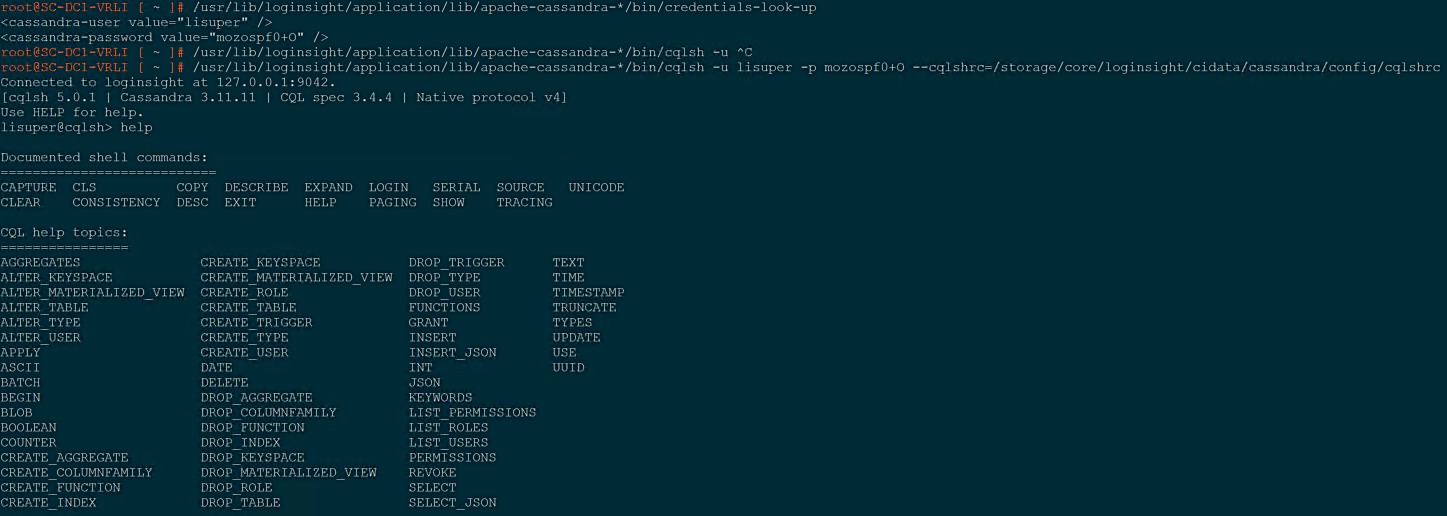
# change to use the correct database
lisuper@cqlsh:logdb> USE logdb;
Now to get account status to see if it is locked out
- Status = 1 - Account is active
- Status = 2 - Account is locked out
# Run the below command to get all the rows from the user table
lisuper@cqlsh:logdb> SELECT *
... FROM user;

# the output will look like the following, you will need the id (first column) and to ensure the status is set to 2

id | api_id | capabilities | data_sets | domain | email | groups | internal | status | type | upn | user_name
--------------------------------------+--------------------------------------+--------------+-----------+--------+-------+----------------------------------------+----------+--------+------+-----+-----------
47130167-3ccb-4a42-a5a2-58dfe42a25b8 | 022a1972-6d7d-4722-a9a8-92bb48a0cc56 | null | null | | null | {00000000-0000-0000-0000-000000000001} | null | 2 | 0 | | admin
00000000-0000-0000-0000-000000000000 | null | null | null | | | {00000000-0000-0000-0000-000000000001} | True | null | 0 | | System

(2 rows)
lisuper@cqlsh:logdb>

Now to re-enable the account
# Run the update command and input your users id
lisuper@cqlsh:logdb> UPDATE user SET status=1
... WHERE id=47130167-3ccb-4a42-a5a2-58dfe42a25b8
... ;

# Confirm the user status is now 1
lisuper@cqlsh:logdb> SELECT * FROM user;

id | api_id | capabilities | data_sets | domain | email | groups | internal | status | type | upn | user_name
--------------------------------------+--------------------------------------+--------------+-----------+--------+-------+----------------------------------------+----------+--------+------+-----+-----------
47130167-3ccb-4a42-a5a2-58dfe42a25b8 | 022a1972-6d7d-4722-a9a8-92bb48a0cc56 | null | null | | null | {00000000-0000-0000-0000-000000000001} | null | 1 | 0 | | admin
00000000-0000-0000-0000-000000000000 | null | null | null | | | {00000000-0000-0000-0000-000000000001} | True | null | 0 | | System

(2 rows)
lisuper@cqlsh:logdb>

Regards
Just running this for the status output the commands that were required for myself were below:
expand on;
use logdb;
select id,status from user where user_name='admin' allow filtering;
#this will give you the id. if status=2 then run the below
update user set status=1 where id=;
select id,status from user where user_name='admin' allow filtering;
I found using the commands SELECT * FROM user; returned the message:
InvalidRequest: Error from server: code=2200 [Invalid query] message="No keyspace has been specified. USE a keyspace, or explicitly specify keyspace.tablename"
Hope this helps
This worked like a charm for me, EXCEPT the procedure left out that you need to do a
USE logdb;
before you attempt to SELECT * FROM user;
awesome thanks, I missed adding this, I've updated the post now :)
Good stuff here, thank you!
Hi, I followed above steps but Im getting error message saying that the username or password are incorrect.
root@logt01 [ ~ ]# /usr/lib/loginsight/application/lib/apache-cassandra-*/bin/credentials-look-up
root@logt01 [ ~ ]#
root@logt01 [ ~ ]# /usr/lib/loginsight/application/lib/apache-cassandra-3.11.11/bin/cqlsh -u lisuper -p tdzgsad8$H --cqlshrc=/storage/core/loginsight/cidata/cassandra/config/cqlshrc
Connection error: ('Unable to connect to any servers', {'127.0.0.1': AuthenticationFailed('Failed to authenticate to 127.0.0.1: Error from server: code=0100 [Bad credentials] message="Provided username lisuper and/or password are incorrect"')})
What could be the problem...?
Hi, I am unsure on this one, I would recommend calling VMware Support for an accurate answer, as this might be highlighting more issues in your vRLI setup.
try running the command with -p option it will prompt for the password. It should work, similar issue seen just today only.
/usr/lib/loginsight/application/lib/apache-cassandra-3.11.11/bin/cqlsh -u lisuper –cqlshrc=/storage/core/loginsight/cidata/cassandra/config/cqlshrc