After moving vEducate from WordPress to Astro, I had a second website to modernise: Heywood Timber Services, a small joinery business site that was already hosted from GitHub.
At first glance, this looked like the easier migration. There was no WordPress database, plugin stack, media library or archive of hundreds of posts. The repository contained one HTML page, some CSS and four photographs. Surely this was just a matter of moving the files to another static host.
The audit showed why migrations should begin with evidence rather than assumptions. The source on main, the branch produced by the deployment workflow and the branch actually served by GitHub Pages were three different versions. Changes could pass through the workflow without reaching the website that customers saw.
This article covers how I turned that drifted one-page site into a small Astro website, retained the original repository history, moved the now-private repository to Cloudflare Pages, and verified the custom-domain cutover without changing the recorded mail DNS state. It is also a useful counterpoint to my WordPress migration series: the operating model was reusable, but most of the blog-specific technology was not.
The migration started with a source-of-truth problem
The repository appeared to have a normal GitHub Pages deployment:
default branch
  -> GitHub Actions workflow
  -> deployment branch
  -> website
That was not what production was doing. GitHub Pages reported one served branch, the workflow published another, and the default branch contained a third version. Recording the commit IDs privately showed that all three disagreed, while the live Last-Modified header matched the stale served branch.
The practical consequences were visible:
- the sitemap and favicon present on
mainreturned 404 in production; - newer metadata and structured data were not live;
- plain HTTP returned a page instead of redirecting to HTTPS;
wwwredirected to the apex but discarded the requested path and query string;/and/index.htmlwere duplicate 200 responses;- the live page had no canonical URL or HSTS; and
- no automated check proved which commit had been published.
The lesson is broader than GitHub Pages: inspect the running service before trusting the repository diagram in your head. For a GitHub Pages site, useful evidence includes the Pages API, branch commits and public responses:
gh api repos/OWNER/REPOSITORY/pages \
  --jq '{status, build_type, source, cname, https_enforced}'

DEFAULT_BRANCH=main
SERVED_BRANCH=replace-with-served-branch
DEPLOYMENT_BRANCH=replace-with-workflow-output-branch
git rev-parse "$DEFAULT_BRANCH" "$SERVED_BRANCH" "$DEPLOYMENT_BRANCH"

curl -sSI https://example.com/
curl -sSI https://example.com/robots.txt
curl -sSI https://example.com/sitemap.xml
Record the commit IDs and responses before changing anything. A green deployment workflow is not proof that production is using its output.
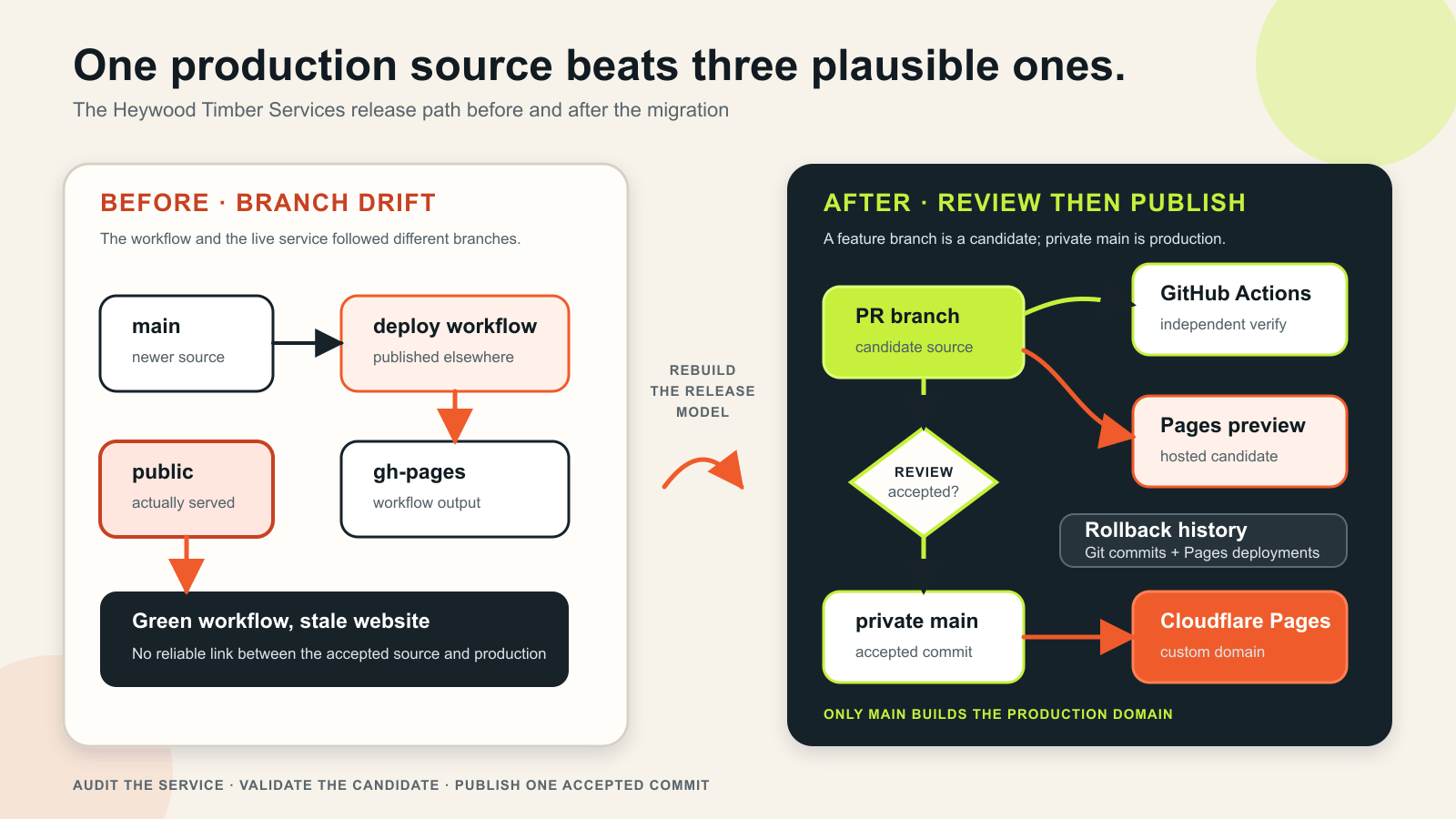
main the single production source and gives validation and hosting separate responsibilities. Open the full-size diagram.In text, the corrected path is: a feature branch in the private repository goes through GitHub Actions and a Cloudflare Pages preview; after review, it merges into main; Cloudflare then builds that accepted main commit for the custom domain. Git and Pages deployment history provide rollback points.
Set requirements before choosing tools
The aim was not merely to make the homepage look newer. I wrote down the operating requirements first:
| Requirement | Design consequence |
|---|---|
| Keep the existing history | Rebuild the original repository instead of creating a replacement |
| Keep source private | Move away from the GitHub Free public-repository Pages arrangement |
| Keep hosting simple and low cost | Generate a fully static site and use Cloudflare Pages |
| Make releases reviewable | Branch, pull request, CI, hosted preview, then merge |
| Keep the site easy to operate | Centralise business details and document ordinary editing tasks |
| Preserve existing URLs | Redirect /index.html and retain the four historical image paths |
| Improve mobile delivery | Generate responsive AVIF and WebP variants from the original photographs |
| Avoid unnecessary data handling | Keep telephone and email links; add no form or analytics initially |
| Protect mail during DNS work | Change only web routing and compare MX/TXT records before and after |
| Keep rollback credible | Retain the old deployment branches during an agreed rollback window |
This was a business and portfolio site, not a blog or web application. It did not need vEducate’s content importer, Markdown collections, comments, search index, RSS, popularity automation or hundreds of redirects. Reusing an architecture means reusing the principles that fit, not copying every component.
Why Astro and Cloudflare Pages fit this site
Keeping the existing single HTML file was a credible option. Static HTML is fast and portable. The problem was not the file extension; it was that one 417-line document also contained more than 250 lines of inline CSS, repeated business facts, manually maintained metadata and direct references to unoptimised photographs. As the site grew, every new page would duplicate more of that work.
Astro provided the small amount of structure the site needed:
- shared page layout, header, footer and contact panel;
- one data file for the name, address, contact details, services and proof points;
- one source file per useful route;
- generated metadata and sitemap output;
- responsive image generation; and
- ordinary static HTML and CSS with no browser JavaScript by default.
React, Next.js and similar application frameworks would have added application-oriented machinery and configuration that this site did not require. Eleventy would also have worked, but Astro was already familiar from vEducate and its image pipeline directly addressed the largest performance problem.
There were also two reasons not to keep GitHub Pages. On the account’s current plan, GitHub Pages supported the required site only while the repository remained public; GitHub documents the repository visibility available on each plan. More importantly for this particular site, GitHub’s Pages limits say the service is not intended as free hosting for an online business.
Cloudflare already managed the domain and email-routing DNS. Its Pages Git integration supports private GitHub repositories, automatic production builds and pull-request previews. That allowed the original repository to become private without introducing a deployment token into GitHub.
The resulting platform remained deliberately small:
business data + Astro pages + repository photographs
                         |
                         v
                    Astro build
                         |
                         v
          HTML + CSS + responsive images + XML
                         |
                         v
                 Cloudflare Pages
                         |
                         v
            heywoodtimberservices.co.uk
There is no database, server-side renderer, Pages Function, contact-form processor or browser application runtime.
Rebuild the content without inventing business facts
A redesign is a dangerous time to turn assumptions into published claims. The old site supplied a business name, public address, telephone number, email address, service area, founding year, service list and four public photographs: one hero and three project images. It did not supply verified accreditations, guarantees, testimonials, opening hours or ratings.
I reorganised the existing facts into six useful routes:
| Route | Purpose |
|---|---|
/ |
Proposition, proof points, selected services and work |
/services/ |
Existing service list grouped into readable areas |
/work/ |
Existing project photography |
/about/ |
Existing history and service-area claims |
/contact/ |
Telephone, email and workshop details |
/privacy/ |
Hosting and enquiry-data explanation |
A custom 404 completed the public route set. I deliberately did not create a page for every service and nearby town. Thin pages with lightly rearranged wording are not more useful just because a sitemap contains more URLs.
Repeated business facts moved into src/data/site.json. The visible pages, navigation and HomeAndConstructionBusiness structured data read from that same file. A simplified example looks like this:
{
  "name": "Example Joinery Business",
  "established": 1989,
  "serviceArea": "Harrogate and the North of England",
  "phone": {
    "display": "public display number",
    "e164": "+44..."
  },
  "email": "public@example.com",
  "serviceGroups": []
}
Centralisation does not prove a fact is correct, but it prevents the footer, contact page and structured data from quietly becoming three different versions of it. Public facts and photograph permissions should therefore be included in the owner’s release acceptance, not treated as assumptions that a build can validate.
Use static output to solve the image problem
The original hero was a 4,181 × 2,777 JPEG weighing 2,396,322 bytes. It was used as a CSS background, so a small mobile screen received the same source file as a desktop monitor.
The rebuilt homepage imports that photograph as an Astro asset and declares the required widths:
<Picture
  src={heroImage}
  alt=""
  formats={['avif']}
  fallbackFormat="webp"
  width={1920}
  widths={[640, 960, 1280, 1600, 1920]}
  sizes="100vw"
  loading="eager"
  fetchpriority="high"
  quality={80}
/>
Astro generates the srcset, modern formats and intrinsic dimensions during the build. On the live site, the 640-pixel AVIF hero variant is 74,629 bytes—about 97% smaller than the original full-resolution JPEG. That is a comparison between two source choices, not a claim that the entire page is only 75 KiB; the build retains several responsive variants so each device can select an appropriate one.
The four old /images/*.jpg URLs were also kept as compatibility files. New pages use hashed Astro assets, while existing links and image-search results still reach stable files. Migration work often focuses on HTML routes and forgets that media URLs can have their own history.
The shared layout now produces:
- a unique title and description for every route;
- canonical and absolute Open Graph URLs;
- a generated 1,200 × 630 social image;
HomeAndConstructionBusinessJSON-LD from the same public data;- a consistent main landmark; and
- a robots directive appropriate to the route.
The sitemap contains the six indexable pages and excludes the 404. /index.html is no longer a duplicate page; public/_redirects contains one permanent redirect:
/index.html / 301Turn quality checks into code
The old repository had no lockfile, test command or definition of a valid production build. The replacement makes the full local gate one command:
{
  "scripts": {
    "test": "node --test scripts/*.test.mjs",
    "validate:source": "node scripts/validate-source.mjs",
    "check": "astro check",
    "build": "npm run build:astro && npm run validate:site",
    "build:astro": "astro build",
    "validate:site": "node scripts/validate-built-site.mjs",
    "verify": "npm run test && npm run validate:source && npm run check && npm run build"
  }
}
These stages answer different questions.
The source validator examines what is about to enter the repository. It rejects selected secret-bearing filenames and extensions—including SQL and SQLite dumps, logs, common archives and key material—plus several credential patterns, symlinks, oversized files and retired GitHub Pages deployment files. It also requires the operating documentation, privacy page, crawler controls and CI workflow to remain present.
The built-site validator examines dist, not the templates that produced it. It checks:
- all expected routes and a genuine 404;
- internal links, stylesheets and responsive-image references;
- one H1, language, description and canonical metadata per page;
- absolute Open Graph metadata and valid business JSON-LD;
- image alternative text and intrinsic dimensions;
- sitemap membership and robots configuration;
- the compatibility image URLs and
/index.htmlredirect; - response-header policy and
pages.devindexing controls; - absence of generated browser JavaScript and source maps; and
- a 700 KiB maximum for every individual built asset.
At migration time, the complete check produced seven HTML pages, six sitemap routes and 63 production files totalling 5,013,764 bytes. Every individual asset was below 700 KiB, and no browser JavaScript or source map was emitted. The total includes all responsive variants and the four compatibility JPEGs, so it should not be confused with the bytes transferred for one page view.
Make GitHub Actions and the hosted preview separate gates
The GitHub workflow is intentionally short:
name: Validate site

on:
  pull_request:
  push:
    branches: [main]
  workflow_dispatch:

permissions:
  contents: read

jobs:
  validate:
    runs-on: ubuntu-latest
    timeout-minutes: 15
    steps:
      - name: Check out repository
        uses: actions/checkout@3d3c42e5aac5ba805825da76410c181273ba90b1 # v7.0.1

      - name: Set up Node.js
        uses: actions/setup-node@820762786026740c76f36085b0efc47a31fe5020 # v7.0.0
        with:
          node-version: 22
          cache: npm

      - name: Install dependencies
        run: npm ci

      - name: Verify source and production build
        run: npm run verify
Repository permissions are read-only, and the third-party actions are pinned to immutable commits. CI validates the candidate; it does not hold a Cloudflare credential or deploy the site.
Cloudflare separately builds the feature branch and exposes the result at a preview URL. Cloudflare’s preview documentation explains that these deployments do not change production and receive X-Robots-Tag: noindex by default.
The two green checks still do not replace human review. The preview gate is where desktop and mobile layout, keyboard navigation, crops, contact links and browser errors must be checked. Keep that owner acceptance separate from automated claims rather than marking it complete after a command-line crawl. Require pull requests, successful checks and review through a protected branch or repository ruleset wherever the GitHub plan supports it; a written merge process is useful, but it is not equivalent to an enforced rule.
One small but important difference between the checks is that Cloudflare runs npm run build, which performs the Astro compilation and then audits the generated site. GitHub runs the broader npm run verify, adding tests, source-policy checks and Astro type checking before that same production build. This means a deployment cannot bypass the output audit merely because it was built by Cloudflare rather than CI.
Configure Cloudflare Pages without adding a deploy secret
The final Pages project settings are reproducible:
| Setting | Value |
|---|---|
| Repository | The existing private GitHub repository |
| Framework preset | Astro |
| Production branch | main |
| Build command | npm run build |
| Output directory | dist |
| Root directory | / |
| Node.js | 22 |
| Deploy command | None |
Restrict the Cloudflare GitHub App to this repository when authorising it. Routine publication then needs no user-created Cloudflare token, GitHub deployment secret or Wrangler command.
The safe sequence is:
- Build and validate the migration branch locally.
- Connect the existing repository to Cloudflare Pages.
- Inspect the branch preview.
- Merge the approved pull request.
- Verify the production Pages deployment.
- Attach and verify the custom domain.
- Disable GitHub Pages.
- Make the repository private.
- Open a harmless follow-up pull request and prove Cloudflare still reads the private repository.
I did not follow that order perfectly. The repository was made private before the custom domain had completely moved. GitHub Pages stopped serving, and one fresh request briefly returned 404 before Cloudflare Pages became active. The interruption was short, but the lesson is clear: establish and verify the new origin before removing the old one.
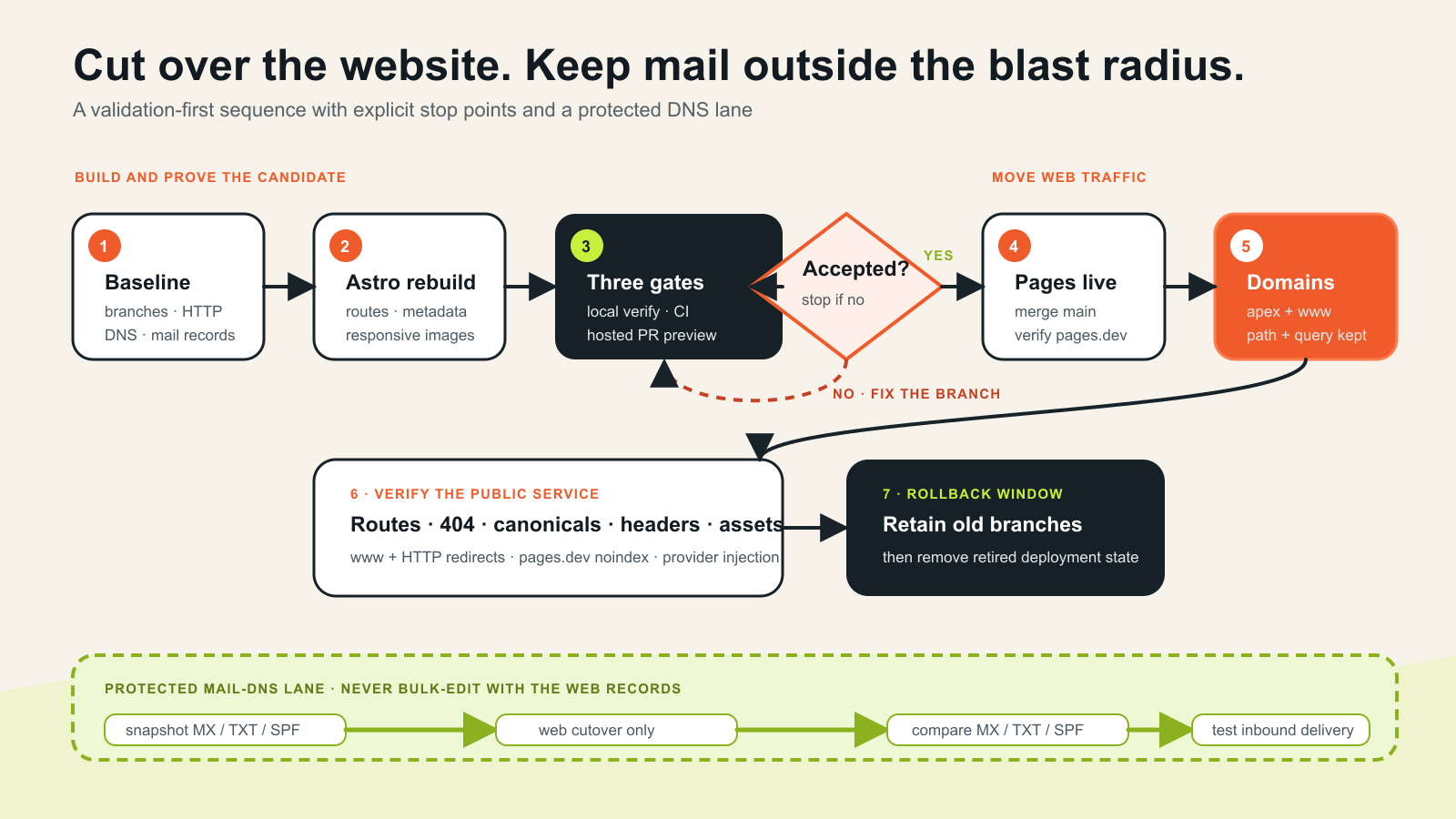
The flow in text is: capture the baseline, rebuild with Astro, pass local verification, GitHub CI and the hosted preview, merge the accepted change, verify the Pages deployment, attach the domains, and test the public service before cleanup. In parallel, snapshot and compare MX, TXT and SPF records, then finish the protected mail lane with a real inbound delivery test.
Cut over DNS without breaking email
The domain already used Cloudflare nameservers, so there was no registrar or nameserver migration. That did not make DNS risk-free. The same zone also contained mail-routing MX records and an SPF record, neither of which belonged in the website change.
Before the cutover, I recorded:
- apex and
wwwweb records, proxy state and targets; - MX and TXT records;
- GitHub Pages settings and the custom-domain claim;
- HTTP, HTTPS, canonical and header responses; and
- the commits behind the old deployment branches.
The apex was then attached through the Pages project’s custom-domain workflow. Cloudflare’s custom-domain documentation covers the supported association and certificate process. Only the known web destination changed.
The canonical host is the apex, so www needed both a proxied DNS record and a permanent redirect. A redirect test must use more than the homepage:
https://www.example.com/services/?source=test
    -> 301
https://example.com/services/?source=test
Testing a deep path with a query string catches rules that silently send every request to /. Cloudflare’s current URL forwarding documentation describes the available redirect products; the exact wildcard replacement syntax depends on which one you choose.
The production checks were:
curl -sSIL 'http://heywoodtimberservices.co.uk/services/?source=test'
curl -sSIL 'https://www.heywoodtimberservices.co.uk/services/?source=test'

dig @1.1.1.1 +short www.heywoodtimberservices.co.uk
dig @8.8.8.8 +short www.heywoodtimberservices.co.uk
dig +short heywoodtimberservices.co.uk MX
dig +short heywoodtimberservices.co.uk TXT
This exposed a useful troubleshooting trap. The local Mac initially reported that www did not resolve even after public resolvers returned the new record and Cloudflare served the correct certificate and redirect. It had cached the earlier negative answer. Comparing multiple public resolvers and using a forced-resolution request proved the edge was healthy; making another DNS change would have disturbed a working configuration.
Check what the provider adds to production
The repository emitted no browser JavaScript and used a strict content security policy:
Content-Security-Policy: ... script-src 'none'; ...The first production check still found JavaScript. Cloudflare Email Address Obfuscation had injected its email-decoder script into the response. The CSP blocked that script, leaving a contact link that depended on code the page expressly refused to run.
The fix was to disable Email Address Obfuscation for the site and retain the normal mailto: link. The point is not that the Cloudflare feature is always wrong; it is that the provider can modify the delivered page after a local build has passed. Inspect production HTML, headers and browser requests rather than assuming that “no script in Git” means “no script at the edge.”
The committed _headers file also supplies the response policy:
/*
  Content-Security-Policy: default-src 'self'; ...; script-src 'none'; ...
  Strict-Transport-Security: max-age=31536000; includeSubDomains
  X-Content-Type-Options: nosniff
  X-Frame-Options: DENY
  Referrer-Policy: strict-origin-when-cross-origin
  Permissions-Policy: camera=(), geolocation=(), microphone=(), payment=(), usb=()
Cloudflare Pages applies repository-owned header rules to the deployed response. Security headers are not a substitute for secure application code, but a static site can use a particularly strict baseline because it does not need third-party scripts, frames or remote fonts.
Control indexing on alternate Pages hosts
Every Pages project also has a stable pages.dev hostname. Canonical tags on that copy point to the public domain, but canonical metadata is not an indexing prohibition. Cloudflare automatically noindexes branch previews; the stable project hostname needs its own explicit policy.
An X-Robots-Tag header controls cooperative crawlers; it is not authentication and must never be used to protect confidential preview content. Put preview deployments behind Cloudflare Access when unpublished material needs access control. If the stable project hostname has no operational purpose, redirect it to the canonical custom domain as an additional consolidation measure.
The site uses absolute-host rules so only Pages hosts receive the header:
https://PROJECT.pages.dev/*
  X-Robots-Tag: noindex, nofollow

https://:version.PROJECT.pages.dev/*
  X-Robots-Tag: noindex, nofollow
Always test both sides:
curl -sSI https://PROJECT.pages.dev/ \
  | grep -i '^x-robots-tag:'

curl -sSI https://heywoodtimberservices.co.uk/ \
  | grep -i '^x-robots-tag:' || true
The Pages hostname should print noindex, nofollow; the apex should print nothing. A global rule would accidentally remove the real site from search.
Verify production, not merely the deployment status
The final automated pass checked the service a visitor and crawler actually receive:
- all six indexable routes returned 200;
- the sitemap contained exactly those six routes;
- all 51 internal page, stylesheet, favicon and responsive-image references returned successfully;
- the four historical image URLs still worked;
/index.html?source=testredirected to/?source=test;- HTTP and
wwwredirected in one hop while retaining path and query; - an unknown route returned a branded page with a real 404 status and
noindex; - canonical, Open Graph and sitemap URLs used the apex domain;
- the stable Pages host returned
X-Robots-Tag: noindex, nofollow, while the apex did not; - CSP, HSTS, framing, MIME, referrer and permissions protections were present;
- Email Address Obfuscation and analytics injection were absent; and
- MX and SPF records matched the pre-cutover values.
I also compared the six live pages with the local production output by hash. They matched. That closes a gap left by the old release model: the repository can now identify the exact content production serves.
Some checks remain deliberately human. A command-line crawl cannot judge whether a hero crop works at 390 pixels, whether keyboard focus is obvious, whether a telephone action opens correctly on a representative device, or whether every published business fact and photograph is approved. The release checklist should also include an external Lighthouse baseline, a real inbound email test and the appropriate search-engine sitemap submission. Record the evidence privately; the absence of an automated error is not proof that these checks passed.
What I deliberately left out
The initial release has no contact form. A form would need an accountable inbox owner, spam protection, a mail provider, delivery monitoring, encrypted secrets, accessible error handling and updated privacy wording. Telephone and email links already meet the current requirement without that operating burden.
It also has no GA4, advertising cookie or external embed. Search Console and Google Business Profile can answer initial discovery questions without adding visitor tracking. Analytics can be considered later as a separate change with a defined purpose and privacy review.
Finally, I did not add client-side navigation, animation libraries or a component framework. The site needs documents and contact actions, not an application runtime. “No JavaScript” is not a universal goal, but it is a useful default when no requirement justifies JavaScript.
Cleanup and rollback are part of the migration
GitHub Pages is now disabled, the repository is private, the obsolete deployment workflow and CNAME are gone from main, and Cloudflare Pages builds production from that private repository.
Retired deployment refs can remain in the protected repository for a short, defined rollback window. That is intentional, not forgotten cleanup. If a new Cloudflare deployment is bad, the normal rollback is to restore the last known-good Pages deployment and revert the corresponding Git change. If the custom-domain association itself fails, the recorded web-only state provides a second recovery path without altering mail.
After owner acceptance and the end of that window, remove the retired deployment state and repeat the final production checks. Provider state, DNS exports and private operational evidence belong in the protected migration workspace; public-safe source, validation and human operating instructions belong in the repository.
Lessons I would reuse
This was a much smaller site than vEducate, but the migration reinforced the same operating principles:
- Audit the live source of truth. The default branch and deployment workflow may not be what production serves.
- Match the architecture to the site. A six-page business site does not need a copied blog platform or application framework.
- Keep public facts structured. One data source reduces drift between visible content and machine-readable metadata.
- Validate the generated output. Template diagnostics do not prove routes, links, headers, sitemaps or asset budgets.
- Separate CI from hosting. GitHub inspects the change; Cloudflare previews and publishes it.
- Move the domain before removing the origin. Making the repository private too early caused an avoidable interruption.
- Treat email DNS as a protected boundary. A website migration should not casually rewrite MX or TXT records.
- Inspect the edge response. Provider features can add behaviour that is absent from Git.
- Test redirects with path and query data. A homepage-only check misses destructive redirect rules.
- Distinguish local DNS cache from public DNS state. Compare resolvers before changing a record twice.
- Keep a rollback source until acceptance is complete. Cleanup has a correct time; day one is usually too early.
The finished system is not complicated: one private repository, one production branch, a deterministic Astro build, independent validation, a hosted preview and a Cloudflare Pages deployment. The improvement is that each of those statements is now testable.
For the content-heavy version of the problem, start with how I chose the vEducate platform, then see how the migration was validated and how the Cloudflare cutover and cleanup worked.