Series: From WordPress to Astro — Part 1 of 5
vEducate had been running on WordPress since 2014. WordPress had done its job well: it gave me an editor, handled media, generated the site and let me publish hundreds of posts without thinking too much about what sat underneath it.
The problem was that the content, presentation and publishing process were all tied to a WordPress installation I could only reach through wp-admin. I did not have shell access to the server, direct database access or a normal way to put the whole site under source control. Plugins handled important pieces of behaviour, but that also meant understanding the site required understanding the plugins and their stored configuration.
I wanted the opposite operating model. The complete website should live in a private GitHub repository, a clean clone should be enough to rebuild it, and publishing should not require an always-running application or database. Hosting also needed to remain free for this kind of personal technical blog.
That sounds like a simple request, but it rules out more options than you might expect. This first part covers the requirements, the options I considered, and why I settled on Astro, private GitHub and Cloudflare Pages.
Series contents
- From WordPress to Astro, Part 1: Choosing the New Platform (you are here)
- From WordPress to Astro, Part 2: Auditing the WordPress Backup
- From WordPress to Astro, Part 3: Converting Content, Media and URLs
- From WordPress to Astro, Part 4: Proving the Site Before Cutover
- From WordPress to Astro, Part 5: Cutting Over Cloudflare Pages and Cleaning Up
Start with requirements, not products
It is easy to begin a migration by comparing themes, JavaScript frameworks or hosting plans. I started with the things the finished platform had to do instead.
The hard requirements were:
- Keep the site source, published content and required media in one private GitHub repository.
- Use free hosting that supports a custom domain and HTTPS.
- Preserve the existing public URLs wherever possible. Links to old technical articles have been shared for years, and breaking them would be a poor result even if the new home page looked better.
- Preserve the useful historical content, images, downloads, categories, tags and approved comments.
- Provide a preview before a change reaches the live site.
- Make every site content and code release reviewable and reversible through Git, with provider-side changes recorded and rolled back separately.
- Rebuild the public site from a clean clone without needing WordPress, its database or the migration backup.
- Leave Cloudflare in control of DNS for
veducate.co.uk. - Keep the design portable enough that another static host could serve it later.
There were also a few things I deliberately did not require. I did not need server-side user accounts, an online shop, a membership area or request-time database queries. I did not need to preserve the WordPress theme or reproduce every plugin. Those details matter because they determine whether a static site is a sensible choice.
If your site accepts payments, has authenticated user areas or changes its output for every request, your decision may be different. Do not choose a static architecture simply because it is fashionable. Choose it when the behaviour of the site fits.
Static site or headless WordPress?
A normal WordPress request passes through several moving parts before the visitor receives a page:
Browser request
    -> web server
    -> PHP and WordPress
    -> database queries
    -> theme and plugin processing
    -> generated HTML response
A static site moves that work into a build:
Markdown, media and site code
    -> Astro build
    -> HTML, CSS and static assets
    -> CDN
    -> browser
The key difference is not simply speed. The production request no longer depends on PHP, a database or a plugin stack. The generated files can be served by any ordinary static web host.
Headless WordPress would have changed the front end while retaining WordPress as the content management system. Astro could fetch posts from the WordPress API during a build and produce static pages from them. That can be a good design when a team needs the WordPress editor, editorial roles and approval workflow.
It did not meet my main requirement, because GitHub would not contain the canonical copy of the content. A successful build would still depend on WordPress being available and returning the expected data. I would also retain the database, updates, backups, security maintenance and hosting that I was trying to remove.
For vEducate, the content needed to move into the repository rather than merely being displayed by a different front end.
The options I considered
The table below records the practical comparison at the time of the decision. Free plans and product limits change, so check the current provider documentation before applying the same decision to your own site.
| Option | Private source repository | Git as content authority | Free hosting fit | Main trade-off | Decision |
|---|---|---|---|---|---|
| Keep normal WordPress | No | No | Depends on existing host | Retains the application, database and plugin maintenance | Rejected |
| Headless WordPress with a static front end | Yes, for code | No | Possible | WordPress remains a build dependency and second source of truth | Rejected |
| Hosted headless CMS | Yes, for code | No | Usually limited by a free tier | Adds another database, account and service dependency | Rejected for the baseline |
| Static scrape of the public site | Yes | Partly | Yes | Copies rendered theme/plugin output and is difficult to edit cleanly | Rejected |
| Astro on GitHub Pages | Not with the required free/private combination | Yes | Did not meet both hard requirements | Private repository requirement was the blocker | Rejected |
| Astro on Netlify | Yes | Yes | Viable | Adds another control plane while DNS remains in Cloudflare | Fallback |
| Astro with Workers Static Assets | Yes | Yes | Viable | More deployment flexibility than this blog needed | Strong alternative |
| Astro on Cloudflare Pages | Yes | Yes | Yes | Publishing becomes a Git and build workflow | Chosen |
A static scrape deserves a little more explanation. Tools can crawl a WordPress site and save the visible pages, which is useful for an emergency archive. It would also preserve a lot of generated markup from the old theme and plugins. That gives you a snapshot, not a clean content system. Editing an article later means working through copied HTML, and data that was never visible to the crawler is simply absent.
I wanted a migration that separated content from its old presentation, so a scrape was a recovery option rather than the main plan.
Why Astro
Astro gave me a useful middle ground. New articles can be written as normal Markdown, while imported posts can retain sanitised HTML where converting every historical formatting edge case would risk changing the article.
It also produces static output by default. That matters because the generated dist directory is not tied to Cloudflare. If I need to move later, any host capable of serving HTML, CSS and images can take the core output, although provider-specific redirect and header rules may need translating.
Astro still gives the site proper reusable components and structured content. One post template can provide the title, publication date, metadata, table of contents, navigation and other page elements. The build can also generate category and tag archives, an RSS feed, sitemaps, search data and a real 404 page.
This is quite different from maintaining hundreds of independent HTML files. The source remains structured, but the production result remains simple.
Another benefit is that the default visitor experience does not need a large client-side JavaScript application. Most vEducate pages are technical articles. They need readable content, working code blocks, images and links, not an application runtime in the browser.
Why a private GitHub repository
The repository is now the source of truth for the site. It contains:
- the Astro application and reusable components;
- imported public content and sanitised approved comments;
- new Markdown articles;
- media required by the published pages;
- redirect rules;
- migration tooling and non-sensitive migration reports; and
- documentation explaining how to build, test, publish and recover the site.
The private repository does not make the website private. Cloudflare publishes the generated output, while the working history and source remain visible only to authorised GitHub users.
Git also improves a fairly ordinary writing workflow. A new post starts on a branch. I can run the site locally, push the branch and inspect a Cloudflare preview. The pull request records what changed. Merging the pull request publishes the accepted commit, and a bad change can be reverted without editing production files by hand.
This does require learning a small amount of Git and Markdown. I considered that a fair trade. The workflow is explicit and documented, and there is no hidden database state to remember later.
Why Cloudflare Pages
Cloudflare already hosted the DNS zone, so Pages kept the domain, TLS and deployment in the same place. Its GitHub integration can read a private repository, build a branch for preview and build the production site from main.
The normal flow is:
Create branch
    -> write or change content
    -> run local checks
    -> push to private GitHub repository
    -> inspect Cloudflare branch preview
    -> review pull request
    -> merge to main
    -> Cloudflare publishes production
The dashboard integration also meant the repository did not need a Cloudflare API token. That reduced the number of long-lived credentials in the publishing path. There was no reason to introduce R2 object storage either; the required public media fits in the repository and within the Pages limits.
Cloudflare Workers Static Assets was a credible alternative, especially if the site later needs request-time logic. Pages was the simpler fit for a blog whose output is already static. Choosing Pages did not close that future route because the Astro build stays portable.
The architecture I chose
The complete design is deliberately small:
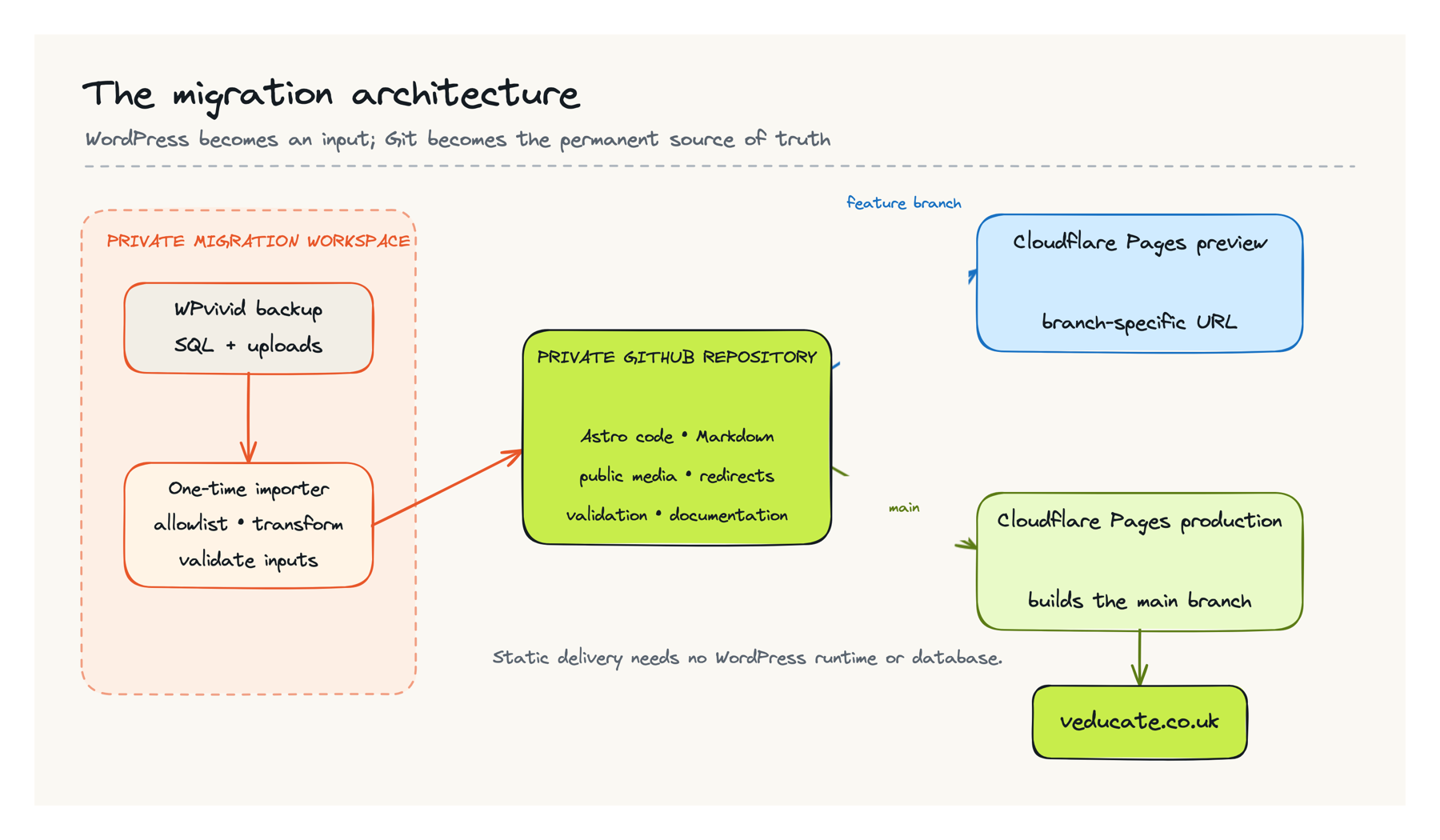
Once the import is accepted, neither Cloudflare nor an ordinary local build reads the backup. The reviewed repository files become the normal build input. If source evidence is retained for audit or reconstruction, keep it in protected storage under a documented retention policy rather than on a public path or in the website repository.
There is no production database, server-side rendering, Pages Function or WordPress API call in the baseline. If a dynamic feature is added later, it should be justified as its own architecture decision rather than quietly turning the static site back into an application platform.
Trade-offs I accepted
The new setup is not WordPress with a different theme.
There is no wp-admin editor. New posts are Markdown files, and media is added to the repository. Publishing waits for a build rather than updating a database immediately. Historical comments can be displayed safely, but the baseline site does not provide a new comment form.
The repository is also larger because it owns the public media needed to rebuild the site. That is intentional. Putting the images in a separate storage service would reduce the clone size, but it would add another account, credential set and source of truth.
Finally, static does not mean maintenance-free. Dependencies still need sensible updates, external links can still break and old technical articles can still become inaccurate. The difference is that infrastructure maintenance is smaller and the complete change history is visible.
Define the exit criteria before migrating
Before converting the first post, I wrote down what had to be true before DNS could move. This prevented “the home page looks right” from becoming the acceptance test.
The main pre-DNS gates were:
- A clean clone could build the complete site without WordPress or the migration backup.
- The public-content totals, routes, redirects, media and privacy exclusions matched a separate acceptance contract.
- The output fitted the host limits and representative content, archives, feeds, search and the 404 response passed on the hosted Pages deployment.
- Existing DNS and rule state was recorded, with a tested, time-limited rollback plan for the old service.
- No backup, database or secret had entered Git history.
Credential closure has its own timing. A credential that is no longer needed should be revoked before cutover; one still required for setup should be revoked immediately afterwards. Treat provider-side revocation as an explicit acceptance check rather than inferring it from deleting code, configuration or a cloud resource.
Those criteria shaped the importer and validation work covered later in this series. They are also reusable: if you cannot describe how you will prove a migration is complete, it is too early to change production DNS.
The resulting platform is less exciting than a complicated architecture diagram, and that is a compliment. Content and code live in Git, Astro turns them into portable files, and Cloudflare Pages serves those files. Part 2 looks at the WordPress data sources and shows how I established that the multipart WPvivid backup was complete enough to become the migration authority.