Series: From WordPress to Astro — Part 3 of 5
By this point I had a checked WordPress database, a complete uploads directory and an inventory of what the backup contained. The next job was to turn that source into a website I could build repeatedly.
A one-off conversion can produce pages that look correct while hiding missed media, broken redirects or private data. I wanted an importer I could run again after fixing a rule, with the same input producing the same output.
This part explains the design of that importer and the awkward WordPress details it had to handle. The code is specific to vEducate, but the boundaries and checks are useful for any database-to-static-site migration.
Series contents
- From WordPress to Astro, Part 1: Choosing the New Platform
- From WordPress to Astro, Part 2: Auditing the WordPress Backup
- From WordPress to Astro, Part 3: Converting Content, Media and URLs (you are here)
- From WordPress to Astro, Part 4: Proving the Site Before Cutover
- From WordPress to Astro, Part 5: Cutting Over Cloudflare Pages and Cleaning Up
Start with the output, not the parser
Before writing any conversion code, I defined what was allowed to land in Git:
- published posts and pages;
- non-public posts retained as drafts, with no public route;
- the public fields from approved comments;
- categories and tags;
- media actually referenced by migrated content;
- the chart data used by posts;
- old slugs and selected redirect rules; and
- a report describing exactly what the importer produced.
Everything outside that public model stayed in the protected migration workspace. Data did not become public merely because it happened to be in WordPress; it had to be deliberately selected.
I also separated imported and future content:
src/content/posts/imported/   # regenerated from the WordPress snapshot
src/content/posts/authored/   # new Git-native articles
src/content/pages/imported/   # regenerated WordPress pages
src/content/pages/authored/   # new Git-native pages
src/data/generated/           # comments, taxonomies, charts and reports
public/wp-content/uploads/    # referenced migrated media
The importer owns the imported content directories, the migrated uploads tree and a named set of migration JSON files. A normal article must never be written under imported, because the next migration run would remove it. New content belongs in authored.
That distinction became more important after launch. A later scheduled workflow added homepage-popularity.json under src/data/generated. It is generated data, but it is not WordPress migration output. The importer therefore removes only the five JSON files it owns instead of deleting the entire directory. Generated output still needs an explicit owner even when no human edits it directly.
The complete conversion flow
The migration pipeline looked like this:
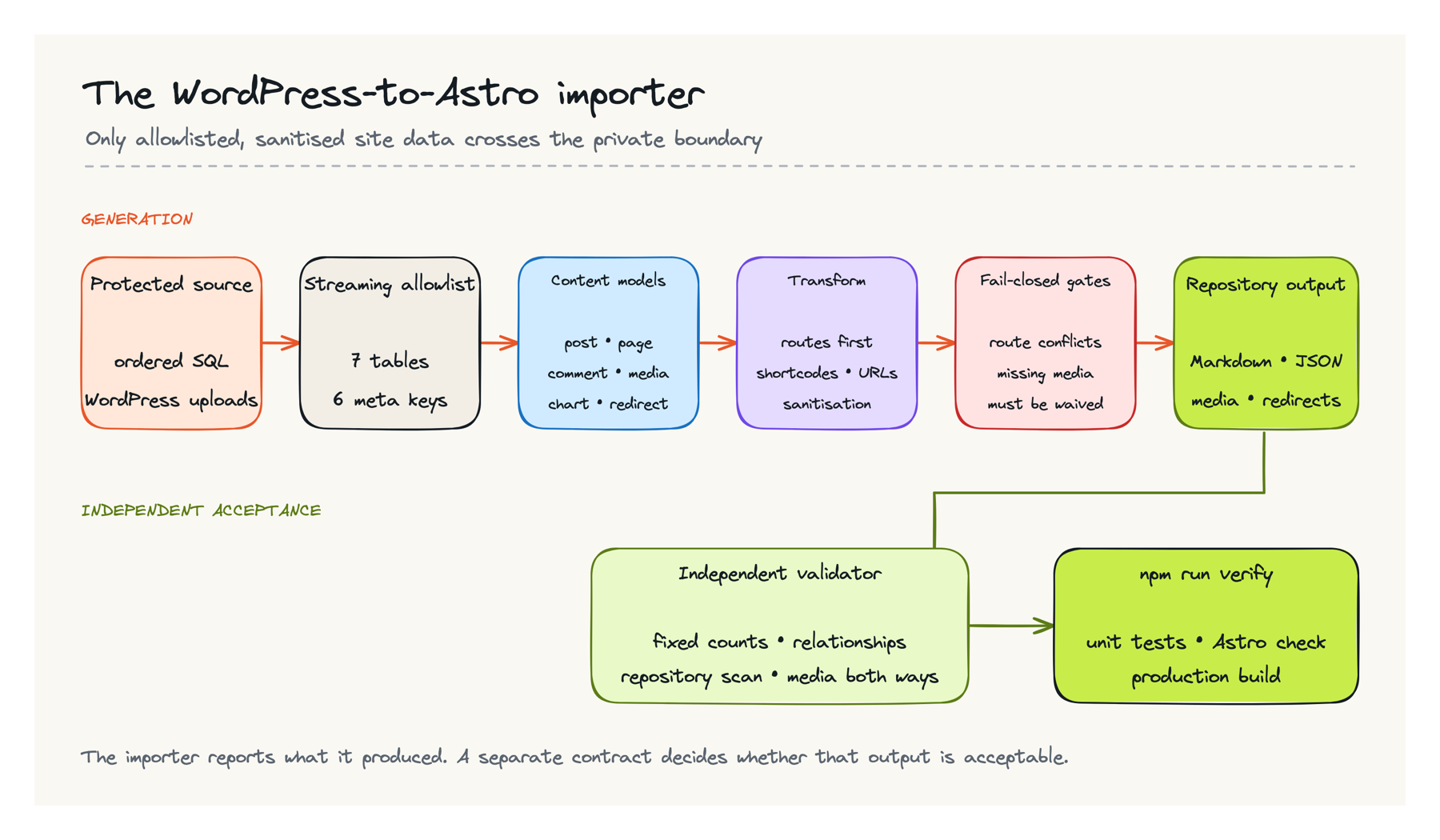
There are two important boundaries in that flow.
First, the source backup remains outside the repository. The command receives database and uploads directories as arguments; it never expects an SQL dump or a backup archive to exist in Git.
Second, generating files is not the same as accepting them. The importer writes a report, but a separate validator owns the expected totals and security rules. I cover that separation in Part 4.
Split the script by responsibility
The importer is a Node.js command, but it is not one enormous file of search-and-replace rules. The testable responsibilities are separated:
scripts/migrate-wordpress.mjs       # command arguments and conversion orchestration
scripts/lib/mysql-dump.mjs          # stream and parse selected SQL tables
scripts/lib/php-serialize.mjs       # decode the plugin data that uses PHP serialisation
scripts/lib/wordpress-html.mjs      # shortcodes, URLs, embeds and sanitisation
scripts/lib/frontmatter.mjs         # write the restricted content format
scripts/lib/redirects.mjs           # validate and generate redirect rules
scripts/validate-migration.mjs      # independent acceptance and security checks
Keep parsing, transformation and file writing separate in your own implementation. A pure HTML transformation function is easy to test with one difficult shortcode. A parser tied directly to filesystem writes is much harder to reason about when one malformed row appears near the end of a large dump.
There is also no universal WordPress importer hidden here. The CLI and output model are reusable, but the accepted tables, metadata keys, shortcodes, plugins and URL history belong to the source site. Treat those items as configuration and reviewed rules rather than expanding the importer whenever it encounters unfamiliar data.
Read only the database tables you need
The WordPress database contained far more than site content. Instead of importing every table and trying to remove sensitive data later, I used a seven-table allowlist:
| Table | Reason it was needed |
|---|---|
wp_posts |
Posts, pages and attachments used for content and media relationships |
wp_postmeta |
Featured images, attachment paths, old slugs and chart data |
wp_terms |
Category and tag names and slugs |
wp_term_taxonomy |
The type and hierarchy of each term |
wp_term_relationships |
Terms assigned to each article |
wp_comments |
Approved public comments |
| Redirect-plugin table | Redirects deliberately selected from the old plugin’s data |
wp_postmeta is effectively a general-purpose key-value store. Reading the whole table would have pulled in plugin state I neither needed nor wanted. The importer accepted only these six keys:
_thumbnail_id
_wp_attached_file
_wp_attachment_image_alt
_wp_old_slug
_wp_page_template
visualizer-series
Your list will be different. Inspect the distinct meta keys in your source and document why each selected key is required. If a key has no clear destination in the new site, leave it behind.
The SQL files for vEducate were around 243 MB and 1.37 million lines, so the importer processed ordered INSERT statements as a stream. It did not restore MySQL locally or read the complete dump into memory. Streaming made the run predictable and removed another database service from the migration environment.
If your export contains multiline statements, stored procedures or a different dump format, do not assume a line reader will work. Test the parser against the exact exporter and database version you have.
Stream the dump without executing it
The reader is deliberately smaller than a general SQL parser. WPvivid produced one INSERT row per line in this backup, so the code can discard almost every line before doing any detailed parsing:
The JavaScript blocks below are focused excerpts from the working importer, not a standalone copy-and-run program. Imports, helper definitions and site-specific configuration are shown only where they explain the migration boundary; use the surrounding checks when adapting them to another export.
const INSERT_PREFIX = 'INSERT INTO `';

export async function readSelectedTables(sqlFiles, selectedTables, onRow) {
  const selected = new Set(selectedTables);
  const counts = Object.fromEntries(
    selectedTables.map((table) => [table, 0]),
  );

  for (const sqlFile of sqlFiles) {
    const reader = createInterface({
      input: createReadStream(sqlFile, { encoding: 'utf8' }),
      crlfDelay: Infinity,
    });

    for await (const line of reader) {
      if (!line.startsWith(INSERT_PREFIX)) continue;

      const tableEnd = line.indexOf('`', INSERT_PREFIX.length);
      if (tableEnd === -1) continue;

      const table = line.slice(INSERT_PREFIX.length, tableEnd);
      if (!selected.has(table)) continue;

      const parsed = parseInsertLine(line);
      if (!parsed) {
        throw new Error(`Could not parse INSERT row in ${sqlFile}`);
      }

      counts[table] += 1;
      await onRow(parsed.table, parsed.values);
    }
  }

  return counts;
}
The SQL is treated as data; none of it is executed. parseInsertLine() walks quoted MySQL values, handles the escape sequences present in the dump and converts NULL and numeric values. The orchestrator then checks the number of fields against the reviewed schema before mapping a row:
if (values.length !== TABLE_WIDTHS[table]) {
  throw new Error(
    `Unexpected ${table} field count: ` +
    `expected ${TABLE_WIDTHS[table]}, received ${values.length}`,
  );
}
That failure is a feature. If a selected table’s row shape changes, the importer stops instead of quietly assigning values to the wrong fields. A changed WordPress table prefix is different: those unfamiliar table names would be skipped, so the dry-run table totals and independent acceptance contract must reject the resulting zero or incomplete counts. Before using this pattern, write parser tests containing escaped quotes, backslashes, NULL, numbers and multibyte text from your own export. If the dump uses multiline or multi-row statements, replace this reader rather than stretching it until it appears to work.
Map WordPress records into explicit content models
WordPress stores posts, pages, attachments, menu items, revisions and other records in the same table. The first mapping step was therefore classification, not HTML conversion.
For each post or page, the importer selected:
- the title, slug, excerpt and dates;
- publication and comment status;
- parent relationships for nested page routes;
- assigned categories and tags;
- featured image and attachment information; and
- the original WordPress ID for internal relationship mapping.
Published, non-password-protected content received a route. Drafts were retained in the repository with draft: true, but the Astro routing layer did not publish them. Trash, auto-drafts, revisions and attachment records were not treated as articles.
The result is stored in an Astro content collection. Authored articles use the Markdown body. Imported articles keep their converted legacy HTML in a frontmatter field that the post route renders deliberately. Keeping those two representations explicit means the site can build category archives, tag archives, feeds, sitemaps and canonical URLs without asking WordPress for anything.
Build every route before rewriting any body
Internal links can refer to a post that appears later in the SQL files. The importer therefore works in passes. It reads and classifies all rows first, creates the complete WordPress-ID-to-route map, rejects duplicate public routes, and only then transforms article bodies:
for (const post of publicItems) {
  const route = post.type === 'page'
    ? createPageRoute(post, posts, pageRouteCache)
    : `/${routeSegment(post.slug, `post-${post.id}`)}/`;

  routeById.set(post.id, route);
}

const routeOwners = new Map();
for (const [id, route] of routeById) {
  if (routeOwners.has(route)) {
    throw new Error(
      `Duplicate public route ${route} for IDs ` +
      `${routeOwners.get(route)} and ${id}`,
    );
  }
  routeOwners.set(route, id);
}
With that map available, a link such as /?p=123 or /?page_id=456 can become the final root-relative route even when post 123 has not yet been written. Nested pages use their parent chain, with a cycle check so corrupted parent data cannot recurse forever. Astro performs another collision check later when it combines posts, pages, categories, tags and archive pagination; the importer alone cannot see every generated route.
Preserve useful HTML without preserving WordPress itself
The old articles were written over many years with the Classic Editor, shortcodes and plugin-generated markup. Converting every body to pretty Markdown would have been satisfying, but it also risked changing code samples, tables, captions and screenshot layouts.
I chose a less dramatic approach:
- future articles use Markdown;
- imported bodies may retain sanitised HTML; and
- WordPress or plugin features are converted only where the static site needs an equivalent.
The converter handled known shortcodes first, then reproduced WordPress paragraph behaviour:
- code blocks became static
<pre><code>blocks; - captions became figures with captions;
- WordPress
[embed]shortcodes became ordinary linked URLs; - existing HTTPS iframes were retained only for approved hosts;
- table-of-contents shortcodes were removed because Astro generates its own contents list; and
- Visualizer chart shortcodes became accessible static tables.
Sanitisation then removed scripts, forms, style blocks, objects, inline event handlers and unsafe URL schemes. Iframes were retained only for an allowlist of YouTube, Spotify and SlideShare hosts.
The order is explicit in the transformation function:
const source = autop(
  transformKnownShortcodes(html ?? '', visualizerTables, visualizerIds),
);

const $ = load(source, null, false);
$('script, style, object, embed, form').remove();

const transformed = sanitizeHtml($.html(), sanitizerOptions)
  .replace(/\u0000/g, '')
  .trim();
Known shortcodes are converted before paragraph handling, DOM rewriting and the final allowlist sanitizer. Removing unfamiliar markup too early can destroy information that a known converter could have represented safely. The separate repository validator scans the committed result again; the transformer is not allowed to mark its own output safe.
The useful test is not whether the new HTML resembles the old database value. It is whether the browser displays the same article meaning without requiring the old theme or plugin JavaScript.
Feed post-cutover findings back into the importer
The first import was not the end of transformation work. A Search Console and built-site audit later found repeated quality problems that were easier to fix at the source boundary than in hundreds of generated files. The durable importer now also:
- normalises articles whose first meaningful heading starts too deep in the hierarchy;
- recovers safe attachment alternative text when the body image has none;
- derives clean plain-text descriptions no longer than 160 characters;
- applies reviewed internal-link rewrites so articles do not point through known redirects; and
- supports narrowly scoped content overrides for a source record whose migrated text is wrong.
These are not global “SEO rewrite” guesses. Each transformation has a bounded rule or a tracked source-specific decision, and the validator checks the resulting metadata, links, headings and assets. Feeding a repeated defect back into the importer keeps a future rerun correct; hand-editing the generated Markdown would only hide the problem until the next import.
Treat internal links as data
WordPress content included several forms of internal URL:
- links to the current apex and
wwwhostnames; - links to an older domain used before vEducate was renamed;
- query links such as
?p=123and?page_id=456; - relative upload URLs; and
- old slugs stored in post metadata.
The importer built a WordPress-ID-to-route map before transforming article bodies. That allowed a query link such as ?p=123 to become the canonical root-relative path for that post.
Historical hostnames were also rewritten to root-relative URLs. Root-relative links are important here: they work on a local server, on a Cloudflare branch preview and on the production domain. Hard-coding a preview hostname into content would create another migration later.
After transformation, the automated checks verify media references, route uniqueness and redirect destinations. Internal article links then receive a separate crawl and manual review. A string replacement alone cannot provide that assurance.
Copy referenced media, not the entire uploads directory
The backup held 14,988 upload files, including WordPress image derivatives and files no longer used by public content. The new repository contains 4,008 referenced files instead.
Media resolution followed a fixed order:
- an exact manual mapping for a known renamed or misplaced file;
- an exact path under
wp-content/uploads; - the original-size image when WordPress HTML referenced a missing size derivative; or
- an explicit waiver for a source file confirmed to be absent.
It never selected a vaguely similar filename. A plausible but incorrect screenshot is worse than a clear missing-image notice.
Three vEducate files required exact manual corrections. One image was absent from both the complete backup and the live site, so that reference received a documented waiver and a visible legacy-image notice. The migration could then report zero unreviewed missing files without pretending the broken source image had been recovered.
A useful mapping file is deliberately boring:
{
  "old/relative/path.png": "verified/relative/path.png"
}
The resolver then tries a short, deterministic candidate list:
const mappedPath = manualMediaMap[normalized];
const candidates = mappedPath ? [mappedPath, normalized] : [normalized];

const withoutSize = normalized.replace(/-\d+x\d+(?=\.[^./]+$)/, '');
if (withoutSize !== normalized) candidates.push(withoutSize);

for (const candidate of candidates) {
  const sourcePath = path.join(uploadsDir, ...candidate.split('/'));
  if (!existsSync(sourcePath) || !statSync(sourcePath).isFile()) continue;

  const result = {
    relativePath: candidate,
    sourcePath,
    publicUrl: publicMediaUrl(candidate),
  };
  mediaSources.set(candidate, sourcePath);
  mediaResolutionCache.set(normalized, result);
  return result;
}

missingMedia.add(normalized);
mediaResolutionCache.set(normalized, null);
return null;
The path is normalised and rejected if it is absolute or contains a parent traversal before this code runs. Public post bodies, featured images and approved comments register the binaries they actually reference; draft-only and orphaned attachments do not enter the repository merely because they exist in uploads.
Keep the reason for each mapping in the migration record. The reusable pattern is tracked exception, exact match, deterministic fallback, then failure. Do not bury exceptions in fuzzy matching code. I kept the exact mappings, missing-file waivers and rare content overrides in separate reviewed files so a rerun applies the same decisions.
Reduce comments to their public form
The database had 2,441 comment rows, but only 267 were approved comments attached to public articles.
For those comments, the generated JSON retained seven fields:
id, postId, author, authorUrl, date, content, parentIdEmail addresses, IP addresses, browser user agents and private moderation fields remained outside Git. Comment HTML passed through the same URL conversion and sanitisation rules as post content.
This is a good example of why copying a WordPress table directly into a static repository is unsafe. A public comment has a public view and a private administrative record; only the former belongs on the site.
Convert plugin data into the simplest useful output
Several posts used the Visualizer plugin. Dataset rows were PHP-serialised in Visualizer post content, while column and series metadata used the visualizer-series postmeta key. Plugin JavaScript combined those records in the browser.
The importer parsed five datasets and converted the four referenced chart IDs into static HTML tables. That removed a runtime plugin dependency while keeping the figures readable, searchable and accessible.
The same rule applies to other plugins: migrate the reader-facing result, not the plugin. A form might become a link to a new form service. A gallery might become normal figures. A chart might become a table or a checked static graphic. Copying plugin configuration into Git only helps if the new site can use it.
Preserve redirects without hiding genuine 404s
The content importer produced 33 redirects:
- 22 old slugs found in post metadata; and
- 11 selected rules from the WordPress redirect plugin.
The deployed redirect file also contains compatibility rules for old category, feed and sitemap paths. Those platform rules are generated separately so it remains clear which redirects came from WordPress content and which belong to the new site.
I did not reproduce a plugin rule that sent every unknown URL to the homepage. That behaviour makes broken links look successful and prevents both people and search engines from distinguishing a removed page from the site root. Unknown paths now return a branded 404 page with a 404 status.
When importing redirects, reject:
- loops and chains you can collapse;
- rules whose source conflicts with a real page;
- external destinations that have not received explicit human review;
- broad wildcards you cannot explain; and
- any rule that turns all failures into a false success.
The vEducate generator accepts credential-free HTTP or HTTPS destinations, including external sites, because a few legitimate historical redirects leave the domain. That makes the redirect review the approval gate; it is not a host allowlist hidden in the script.
Run the importer in two stages
With the source directories outside Git, the first run is read-only. Run these commands from the Astro repository root; the variables point back to the private workspace created in Part 2:
WORK="${WORK:-$HOME/wordpress-migration}"
export DB="$WORK/private/extracted/database"
export UPLOADS="$WORK/private/extracted/wp-content/uploads"

npm ci
npm run migrate -- \
  --db-dir "$DB" \
  --uploads-dir "$UPLOADS" \
  --dry-run
The dry run parses everything, resolves content relationships and media, then prints the proposed migration report. It finishes with:
Dry run complete; no repository files were changed.Review that report before allowing a write. In particular, look for unexpected changes in published content, public comments, media bytes, redirects and missing-file exceptions.
Before the first destructive write, require a clean worktree. Commit, move or otherwise preserve any intentional work instead of letting the importer overwrite it:
git status --shortThat command should print nothing. Pay particular attention to imported content, migrated uploads,
the five migration JSON files and public/_redirects, because the importer owns those paths. The
write run then uses the same code path without --dry-run:
npm run migrate -- \
  --db-dir "$DB" \
  --uploads-dir "$UPLOADS"
Let the importer replace only what it owns
The write phase is intentionally destructive inside the two imported content directories and the migrated uploads tree. Under the shared generated-data directory, it removes only its named outputs:
const MIGRATION_DATA_FILES = [
  'comments.json',
  'taxonomies.json',
  'redirects.json',
  'charts.json',
  'migration-report.json',
];

await Promise.all([
  rm(GENERATED_POSTS, { recursive: true, force: true }),
  rm(GENERATED_PAGES, { recursive: true, force: true }),
  rm(GENERATED_UPLOADS, { recursive: true, force: true }),
  ...MIGRATION_DATA_FILES.map((fileName) =>
    rm(path.join(GENERATED_DATA, fileName), { force: true }),
  ),
]);
Those constants point to posts/imported, pages/imported, src/data/generated and the selected migrated uploads. The sibling posts/authored and pages/authored directories are not touched, and unrelated generated files remain in place. This ownership boundary makes a rerun safe after the site begins publishing Git-native articles and adding other repository-owned automation.
Rebuilding every importer-owned output from an empty state also catches a useful class of bugs: a file removed from the source cannot survive because it happened to be left over from the previous run. SQL filenames, comments, taxonomy terms, redirects and media entries are explicitly sorted; content and chart records follow their deterministic source insertion order. Generated JSON ends with a newline. Small details like those are what make the following determinism check meaningful rather than noisy.
For vEducate, the accepted output was:
| Output | Accepted result |
|---|---|
| Published posts | 352 |
| Published pages | 4 |
| Non-public items | 16 |
| Approved public comments | 267 |
| Categories | 10 |
| Tags | 1,232 |
| Referenced media files | 4,008 |
| Referenced media bytes | 462,598,644 |
| Chart datasets | 5 |
| Imported content redirects | 33 |
| Unreviewed missing media | 0 |
These are vEducate’s numbers, not targets for another site. Your acceptance values should come from your source inventory and any documented exclusions.
Make the second run boring
After the first successful write and review, I committed that candidate baseline on the migration branch. I then started from a clean worktree, ran the same command again and expected no repository changes:
npm run migrate -- \
  --db-dir "$DB" \
  --uploads-dir "$UPLOADS"

git diff --exit-code
test -z "$(git status --porcelain)"
Both commands should exit with zero. git diff --exit-code checks tracked content, while the status check also catches newly created untracked files. If generated records change order, dates change on every run or media names drift, fix that before cutover. Otherwise every future correction becomes mixed with meaningless changes.
At this stage the conversion was repeatable, but it was not yet accepted. The next part covers the independent counts, security scans, clean-clone build and visual checks used to decide whether it was safe to move DNS.
Continue to Part 4 — Proving the site before cutover.