Series: From WordPress to Astro — Part 2 of 5
Before writing an importer, I needed to know which WordPress source I could trust. A public REST response, a WordPress export and a full backup can all contain posts, but they do not contain the same data and they are not interchangeable.
This mattered more for vEducate because I had access to wp-admin, but not SSH, the hosting control panel or the database server. I could inspect the live site, call the public API, use WordPress export tools and run an installed backup plugin. I could not simply connect to MySQL and copy the uploads directory from the server.
The eventual source was a six-part WPvivid backup containing a coherent database and filesystem snapshot. I did not assume it was usable just because all six download buttons had completed. I recorded the files, generated checksums, tested every ZIP, checked archive paths and built an inventory before any data was allowed near the Git repository.
This part explains that decision and gives you a reusable way to audit a similar backup.
Series contents
- From WordPress to Astro, Part 1: Choosing the New Platform
- From WordPress to Astro, Part 2: Auditing the WordPress Backup (you are here)
- From WordPress to Astro, Part 3: Converting Content, Media and URLs
- From WordPress to Astro, Part 4: Proving the Site Before Cutover
- From WordPress to Astro, Part 5: Cutting Over Cloudflare Pages and Cleaning Up
The wp-admin-only constraint
Limited hosting access changes how you recover a WordPress site, but it does not mean the public pages are your only source.
I had four realistic options:
- Read public content through the WordPress REST API.
- Authenticate to the API and request edit context.
- Download a WordPress eXtended RSS (WXR) file from Tools > Export.
- Use the installed WPvivid plugin to create and download a complete backup.
The important question was not “which option is easiest to parse?” It was “which source lets me account for all required public content while safely excluding private and operational data?”
What the REST API gives you
The WordPress REST API was useful for discovery. Public post responses included the post ID, date, slug, status, link, rendered title and content, author, featured-media ID, categories and tags.
That was enough to count public resources and compare visible URLs later. It was not a complete migration source.
The public API returned rendered post content rather than the unmodified editor value. Rendered HTML can already contain shortcode output, plugin placeholders and theme-related transformations. Public endpoints also omit drafts and private records, and they only expose metadata that WordPress or a plugin deliberately registered with the API.
Authenticated context=edit access can add raw content and drafts for an authorised user. It still does not automatically expose arbitrary plugin tables, unregistered metadata or the files under wp-content/uploads. Media endpoints describe attachments; they do not provide an auditable copy of every referenced file.
For this migration, REST became a live cross-check rather than the authority.
What a WXR export gives you
The normal WordPress export creates a WXR file: an XML document containing posts, pages, terms, comments and selected metadata. It is portable and well suited to moving content into another WordPress installation.
WXR would have been useful if a database backup was unavailable. It still needs separate handling for media and plugin-owned data, and it can contain personal data. The complete backup had also captured the database and files together; creating a WXR later would produce a second snapshot that needed reconciliation.
Once the full backup passed its checks, downloading WXR would add another sensitive source without filling a gap. I kept it as a fallback, not a required step.
Why the WPvivid backup became authoritative
The WPvivid backup held the broadest, same-time view of the site:
- the database;
- the uploads library;
- themes and plugins;
- other
wp-contentdata; and - the WordPress core payload and backup manifests.
Not all of those files belong in the new site. The point is that the source was complete enough for the migration to make explicit choices.
The database let the importer select approved comments, inspect old slugs, reconstruct taxonomies and read plugin-owned redirect data plus Visualizer custom-post and metadata records. The uploads archives supplied the media referenced by posts.
The backup also contained data that must never be published: users, password hashes, private commenter fields, security logs, analytics records, plugin settings and potentially credentials. A full backup is more useful precisely because it is more sensitive. It belongs in a protected working area, not in the website repository.
The comparison looked like this:
| Source | Useful for | Important gaps | Role in this migration |
|---|---|---|---|
| Public REST | Public inventory and live URL checks | No raw content, drafts, arbitrary plugin data or media filesystem | Cross-check |
| Authenticated REST | Raw content and non-public records permitted to the user | Still dependent on registered schemas and custom endpoints | Not required |
| WXR export | Portable WordPress content, terms and comments | Not a full database, plugin or filesystem snapshot | Fallback |
| WPvivid full backup | Coherent database, uploads and implementation reference | Highly sensitive and requires controlled extraction | Authoritative source |
Record exact software versions in the protected migration inventory while wp-admin and the
backup manifest are still available. This snapshot captured the WordPress, PHP and database
provenance, but not the backup-plugin release. That is a limitation: the archive shape and tested
parser behaviour remain useful reproducibility evidence, but they cannot establish a plugin-version
match that was never recorded. Point-in-time runtime values age quickly and are unnecessary in the
public write-up; keep them with the private source evidence instead.
Understand multipart WPvivid backups
The vEducate download consisted of six outer ZIP files totalling about 912 MiB. Despite their part001 to part006 names, they were independent ZIP containers. They did not need to be concatenated.
Each outer ZIP held a manifest and one or more child archives. Across the six files, the child payloads included one database archive, a theme archive, a plugin archive, five upload archives, a general content archive and a WordPress core archive.
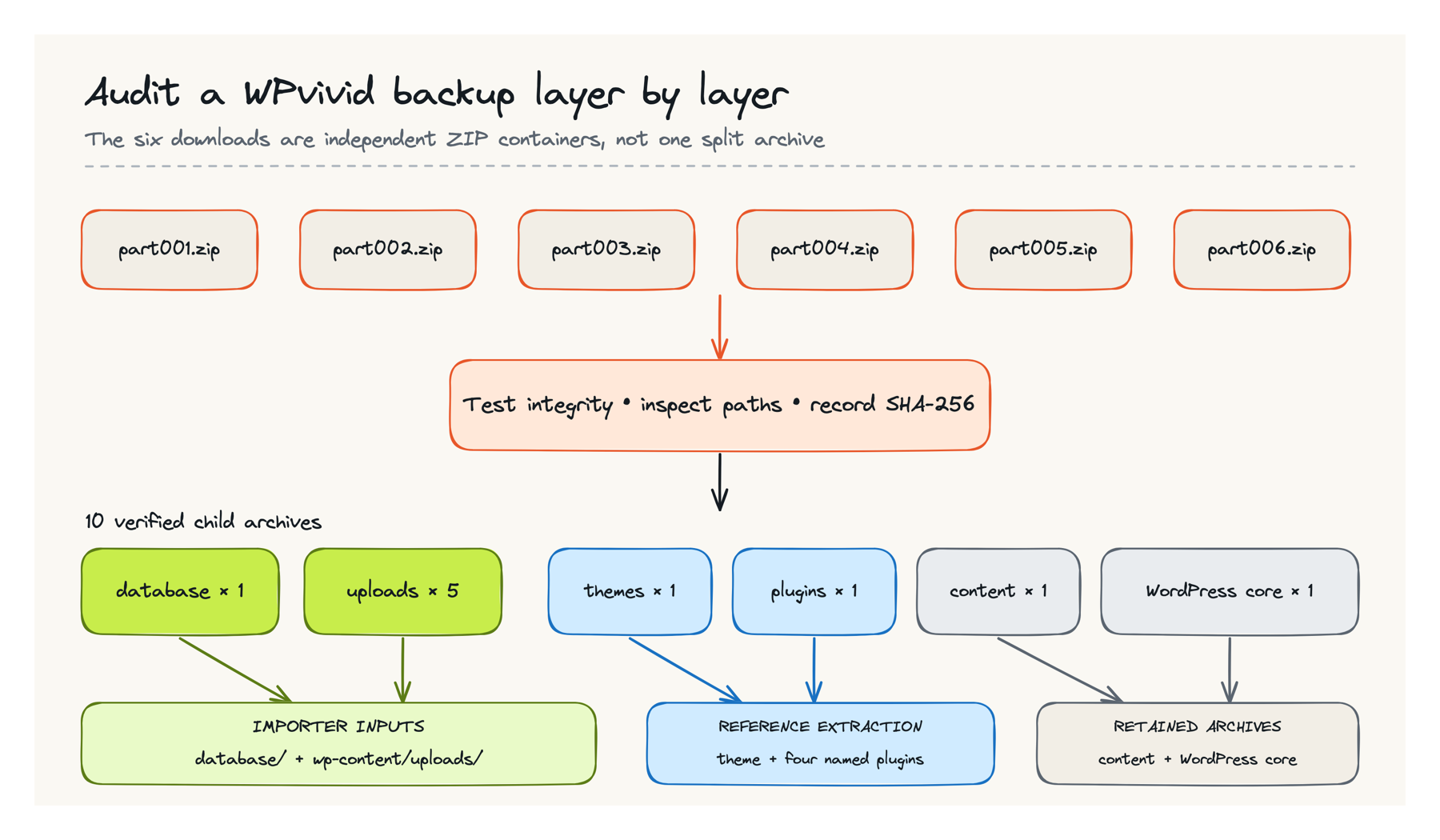
Joining independent ZIPs with cat would create the wrong input. Start by asking the archive tools what you actually downloaded:
zipinfo -1 backup-part001.zip | head
unzip -l backup-part001.zip
For this backup, the listing showed nested ZIP files and a manifest. If your result instead describes a genuinely split archive format, follow the backup product’s documented recovery process rather than applying the commands below blindly.
Create a private working area
Keep migration material away from the website checkout. The following example creates an owner-only workspace under your home directory:
umask 077

WORK="$HOME/wordpress-migration"
SOURCE="$WORK/source"
PRIVATE="$WORK/private"
REPORTS="$WORK/reports"

mkdir -p "$SOURCE" "$PRIVATE/outer" "$PRIVATE/extracted" "$REPORTS"
chmod -R go-rwx "$WORK"
Copy the downloaded backup files into $SOURCE. Do not put the workspace inside a Git repository, a public cloud-synchronised folder or a shared directory.
The umask 077 setting makes new files private to your user, while chmod -R go-rwx removes all group and other permissions from the existing tree without marking ordinary files executable. Use this alongside disk encryption and a properly secured computer.
Record the source before extracting it
List the files and generate a checksum record while the downloads are still untouched:
find "$SOURCE" -maxdepth 1 -type f -name '*.zip' -print | sort

find "$SOURCE" -maxdepth 1 -type f -name '*.zip' -exec \
  shasum -a 256 {} \; | sort > "$REPORTS/source-sha256.txt"

cat "$REPORTS/source-sha256.txt"
For vEducate, the evidence at this point was six checksum lines. I also recorded the byte size reported for each file and the combined total. Your counts will be different, but the report should be specific enough to identify the exact snapshot later.
To prove that retained files have not changed, run the check from the same source location using a checksum file whose paths match that layout:
cd "$SOURCE"
shasum -a 256 -c "$REPORTS/source-sha256.txt"
Every entry must report OK. A mismatch does not automatically mean malicious tampering; an interrupted download is much more likely. It does mean you do not have the snapshot you recorded, so stop and download or investigate the affected file.
Test every outer archive
A successful browser download does not prove that the ZIP can be read from beginning to end. Test all outer archives before extraction:
for archive in "$SOURCE"/*.zip
do
  echo "Testing $(basename "$archive")"
  unzip -tq "$archive" || exit 1
done
The expected result is a successful test for every file. || exit 1 stops at the first damaged archive rather than letting later output hide the failure.
For vEducate, all six outer archives passed.
Audit paths before extraction
ZIP files can contain absolute paths or .. segments that write outside the intended directory. Backups you created yourself are less suspicious than an archive downloaded from an unknown source, but they still deserve the same check.
Run this against each outer archive:
for archive in "$SOURCE"/*.zip
do
  echo "Checking paths in $(basename "$archive")"

  zipinfo -1 "$archive" | awk '
    /^\// || /(^|\/)\.\.(\/|$)/ || /\\/ {
      print "unsafe: " $0
      bad=1
    }
    END { exit bad }
  ' || exit 1
done
No unsafe: lines are expected. This checks names for Unix absolute paths,
parent-directory traversal and backslash paths. It does not inspect the ZIP entry type. Reject
symlinks, devices and other special entries separately before extraction:
for archive in "$SOURCE"/*.zip
do
  python3 - "$archive" <<'PY' || exit 1
import stat
import sys
import zipfile

with zipfile.ZipFile(sys.argv[1]) as source:
    for entry in source.infolist():
        file_type = stat.S_IFMT(entry.external_attr >> 16)
        if file_type not in (0, stat.S_IFREG, stat.S_IFDIR):
            raise SystemExit(f"unsafe entry type: {entry.filename}")
PY
done
Together, these checks establish that the listed names and entry types are suitable for extraction into the chosen owner-only root. They do not establish that the contents are safe to publish. Run both checks against the nested archives as well.
Extract the outer containers and test the children
Give each outer ZIP its own directory. This avoids collisions between manifests and makes it clear which downloaded part supplied each child archive:
for archive in "$SOURCE"/*.zip
do
  name=$(basename "$archive" .zip)
  target="$PRIVATE/outer/$name"

  mkdir -p "$target"
  unzip -q "$archive" -d "$target"
done
Now inventory and test the nested ZIPs:
find "$PRIVATE/outer" -type f -name '*.zip' -print | sort

find "$PRIVATE/outer" -type f -name '*.zip' -print | sort |
while IFS= read -r archive
do
  echo "Testing $(basename "$archive")"
  unzip -tq "$archive" || exit 1
done || exit 1
The vEducate source contained ten child archives, and all ten passed. I then ran the same path audit against those children before extracting the database or uploads.
Do not extract everything just because it is present. The importer needed neither WordPress core nor the complete plugin tree. Leaving them archived reduced the amount of private material exposed.
Extract only what the migration needs
For an initial content inventory, extract the database and overlay the upload parts into one wp-content/uploads tree:
mkdir -p "$PRIVATE/extracted/database"
mkdir -p "$PRIVATE/extracted/wp-content"

DB_COUNT=$(find "$PRIVATE/outer" -type f -name '*_backup_db.zip' | wc -l | tr -d ' ')
test "$DB_COUNT" -eq 1 || {
  echo "Expected 1 database archive; found $DB_COUNT"
  exit 1
}
DB_ARCHIVE=$(find "$PRIVATE/outer" -type f -name '*_backup_db.zip' -print -quit)
unzip -q "$DB_ARCHIVE" -d "$PRIVATE/extracted/database"

UPLOAD_LIST="$REPORTS/upload-archives.txt"
find "$PRIVATE/outer" -type f -name '*_backup_uploads.part*.zip' -print | sort > "$UPLOAD_LIST"
UPLOAD_COUNT=$(wc -l < "$UPLOAD_LIST" | tr -d ' ')
test "$UPLOAD_COUNT" -eq 5 || {
  echo "Expected 5 upload archives; found $UPLOAD_COUNT"
  exit 1
}

while IFS= read -r archive
do
  unzip -oq "$archive" -d "$PRIVATE/extracted/wp-content"
done < "$UPLOAD_LIST"
The count checks stop the script before unzip if the database or any expected upload part is
missing. The expected upload count of five comes from this backup’s recorded inventory; use your
own known count. If your backup uses different names, locate the payload from the recorded archive
listing rather than changing a wildcard until it happens to match something.
WPvivid upload parts are intended to overlay into the same tree. The -o flag makes that reviewed
overwrite policy non-interactive; without it, unzip can prompt on a shared manifest and consume
input intended for the archive-list loop. The untouched outer directories and their manifests
remain the evidence for each source part.
Build an inventory you can compare later
At minimum, record SQL files, upload counts, total bytes and the largest files:
find "$PRIVATE/extracted/database" -type f -name '*.sql' -print -exec wc -lc {} \;

find "$PRIVATE/extracted/wp-content/uploads" -type f | wc -l

find "$PRIVATE/extracted/wp-content/uploads" -type f -print0 |
  xargs -0 stat -f '%z' |
  awk '{ total += $1 } END { print total " bytes" }'

find "$PRIVATE/extracted/wp-content/uploads" -type f -print0 |
  xargs -0 stat -f '%z %N' |
  sort -nr | head -20
The stat syntax above is for macOS. On Linux, use stat -c '%s %n' instead.
My accepted extraction contained two SQL files totalling 242,585,629 bytes and 1,376,665 lines. The complete upload source held 14,988 files totalling 906,454,264 bytes. The largest real upload was below Cloudflare Pages’ individual-file limit; large cache logs were not public media and did not need to move.
These figures did not prove the content migration was correct. They gave me a stable source inventory to compare with importer results. If a rerun suddenly found one SQL file or half the uploads, it could fail before producing a plausible-looking but incomplete website.
I also inventoried the database tables before selecting anything. The migration needed posts, a small allowlist of post metadata, terms, taxonomy relationships, comments and the specific plugin table that held redirect definitions. It did not need user tables, security logs or more than a million historical 404 request-log rows.
The safe pattern is to allow known tables and fields, not import the whole database and try to remove private material afterwards.
Keep the raw source out of Git
None of the following belongs in the website repository:
- source or child ZIP archives;
- SQL dumps or a restored database;
wp-config.phpor copied.htaccessfiles;- user and user-meta tables;
- password hashes, API credentials or private keys;
- raw comments containing email addresses, IP addresses or user agents;
- security, analytics and request logs; or
- plugin caches and old backup directories found under uploads.
Only sanitised public content, selected public media and aggregate migration reports should cross that boundary. Add archive and SQL patterns to .gitignore, but do not rely on .gitignore alone. A repository validation step should reject backup formats, database signatures and common credential patterns before a commit can be accepted.
The audit gate
I considered the backup ready for importer development only when all of the following were true:
- All six downloaded files were present with recorded sizes and SHA-256 hashes.
- Every outer and child ZIP passed a complete integrity test.
- Archive paths contained no absolute or parent-directory traversal entries.
- The database and all five upload payloads extracted into an owner-only workspace.
- SQL and upload totals were recorded as fixed source evidence.
- The useful tables and media were distinguishable from private and operational data.
- The original archives remained untouched so a clean extraction could be repeated.
- No raw migration source had entered the Git working tree or history.
That gate is intentionally boring. Discovering a missing upload part while designing the importer is inconvenient; discovering it after changing DNS is much worse.
The REST API still had value after this point. I could compare public counts, dates and routes with the live site. WXR remained a recovery option if the database archive later proved unusable. Neither needed to compete with a full snapshot that had already passed the audit.
With a trusted source and a recorded inventory, the next job was controlled transformation rather than recovery guesswork. Part 3 covers the importer, the WordPress-to-Astro data mapping and how the new site preserved historical URLs without carrying the WordPress application into production.