Series: From WordPress to Astro — Part 4 of 5
Moving content is not the same as proving a migration. A script can finish successfully while dropping records, changing routes, copying private data, or producing a site that only works on the machine where it was built. Before DNS moved, I wanted stronger evidence than “the homepage looks right.”
This part covers the validation model I used for the static site: an independent acceptance contract, parser and security tests, a complete production build, a deterministic migration rerun, a clean-clone test and a hosted Cloudflare Pages review. The next part deals with the separate job of verifying the public service after DNS changes.
Series contents
- From WordPress to Astro, Part 1: Choosing the New Platform
- From WordPress to Astro, Part 2: Auditing the WordPress Backup
- From WordPress to Astro, Part 3: Converting Content, Media and URLs
- From WordPress to Astro, Part 4: Proving the Site Before Cutover (you are here)
- From WordPress to Astro, Part 5: Cutting Over Cloudflare Pages and Cleaning Up
Validation and verification answer different questions
I use two words deliberately:
- Validation asks whether the repository contains the complete, safe and internally consistent site I intended to build.
- Verification asks whether the live domain, TLS, redirects, DNS and external services behave correctly after deployment.
Validation happens before DNS. It can be repeated locally, in GitHub Actions and in a Pages preview without touching production. Verification happens against the deployed service. It includes facts the repository cannot prove, such as which certificate a visitor receives or whether an old hostname redirects in one hop.
Keeping the two stages separate makes failures easier to diagnose. If a route is absent from the generated output, DNS will not fix it. If the generated route exists but the public domain reaches the wrong service, rebuilding Astro will not fix that either.
Start with an independent acceptance contract
The importer produces a migration report, but it would be weak assurance to let the importer declare its own output correct. A bug could alter both the generated content and the report in the same run. I therefore placed the expected WordPress baseline in a separate validator.
For this migration, the fixed public-content contract was:
| Measure | Accepted baseline |
|---|---|
| Published posts | 352 |
| Published pages | 4 |
| Retained non-public posts and pages | 16 |
| Approved public comments | 267 |
| Categories | 10 |
| Tags | 1,232 |
| Deliberate imported redirects | 33 |
| Converted chart datasets | 5 |
| Referenced public media files | 4,008 |
| Referenced public media bytes | 462,598,644 |
These numbers are not generic WordPress targets. They describe one reviewed backup and its deliberately selected public output. A different backup needs a different contract.
The important implementation detail is that these values live in the validator’s source, not in the generated migration report:
export const EXPECTED_MIGRATION = Object.freeze({
  content: Object.freeze({
    publishedPosts: 352,
    publishedPages: 4,
    nonPublicItems: 16,
    approvedPublicComments: 267,
    categories: 10,
    tags: 1232,
  }),
  media: Object.freeze({ files: 4008, bytes: 462598644 }),
  redirects: 33,
  charts: 5,
});
The importer writes the observed values to migration-report.json; the validator compares those values with this separately reviewed contract and with the files actually present. Changing an expectation is therefore a visible source-code decision, not an automatic side effect of rerunning the importer.
The working validator also pins the identities of plugin objects referenced by public content. Those site-specific identifiers are implementation data, not useful tutorial values, so the public example shows the count and the validation pattern without publishing the allowlist itself.
The distinction between imported and authored content also matters. New Markdown articles are allowed to increase the number of site pages, but they must not silently change the fixed WordPress baseline. The validator counts those two ownership areas separately. That lets the historical import remain reproducible while the site continues to grow in Git.
Counts alone are not enough. The validator also checks identities and relationships: WordPress IDs are unique, comments point to published posts, parent comments exist, routes do not collide, redirect destinations resolve, and a taxonomy slug does not acquire two different names. A site can have the right total number of posts and still be wrong in every one of those ways.
Test the machinery, then test the result
There are two useful kinds of automated test in this repository.
The first kind tests small pieces of migration machinery. It gives deliberately awkward input to the MySQL row parser, PHP serialisation parser, route normaliser, redirect generator and frontmatter reader. This is where escaped quotes, multibyte text, malformed serialised values and path traversal attempts belong. A unit test can identify the exact rule that broke without first building thousands of files.
The second kind audits the committed result. It does not trust that a parser test passing means the actual content is safe. It walks the generated Markdown, JSON, redirects and media and checks what will really be deployed.
The release command brings both kinds together:
npm run verifyAt cutover, that command had four migration-focused gates. The repository has since gained Search Console history, consented-analytics reporting, workspace-archive tooling and an automated homepage-popularity contract. The current command runs these gates in order:
- Unit tests for the migration, Search Console, Google Analytics and workspace archive.
- Validation of repository-owned data, the Search Console snapshot and homepage-popularity contract.
- Independent migration and repository-security validation.
- Astro and TypeScript diagnostics with
astro check. - A complete production build with
astro build. - Built-output checks covering metadata, sitemaps, redirects, routes, links, fragments, headers
and assets. The repository’s
npm run buildcommand composes these last two stages.
That growth is deliberate rather than a reason to copy every vEducate command into another
site. Start with the checks that prove your migration, then add a gate when the repository gains a
new durable data contract. The important rule is that npm run verify remains the single local
and CI entry point.
Stopping on the first failure is intentional. A successful build does not excuse a privacy failure, and a correct record count does not excuse invalid Astro markup.
Treat safety rules as acceptance rules
A WordPress database contains far more than publishable articles. It may hold password hashes, sessions, email addresses, IP addresses, plugin credentials, security logs, pending comments and analytics tokens. The safest migration is selective: extract only the tables and fields the public site needs, then check the repository again as if the extraction code might be wrong.
The repository audit rejects raw database dumps, backup archives, environment files, private keys and common credential containers. It scans text for recognisable token forms and checks that symbolic links cannot escape the repository. Authored and imported HTML are checked for scripts, inline event handlers, unsafe URL schemes, forms and unapproved iframe hosts.
Media receives the same treatment. Every selected migrated upload must be referenced by published content or an approved public comment, and every reference must point to an existing file. This catches both missing screenshots and accidentally deployed orphaned files. New authored media must also exist under the public asset tree before validation passes.
The check deliberately works in both directions:
for (const [relativePath, referencedBy] of references) {
  record(
    issues,
    available.has(relativePath),
    `${referencedBy}: referenced media file does not exist`,
  );
}

for (const relativePath of available) {
  record(
    issues,
    references.has(relativePath),
    `deployed media is not referenced by public content: ${relativePath}`,
  );
}
The first loop catches broken articles. The second catches an extra file that would be publicly deployed even though no accepted content selected it.
These checks do not eliminate human review. A screenshot can contain sensitive information without matching a token pattern, and a technically valid paragraph can disclose something it should not. Automation narrows the review problem; it does not replace judgement.
The scanner is also intentionally bounded. Keep its coverage assumptions and exceptions in the maintainer threat model, test them, and combine it with independent review appropriate to the repository’s history and assets. Publishing a detailed map of thresholds and blind spots would add little teaching value while making avoidance easier. A passing command is one signal, not a universal security audit.
Inspect the built site, not just the source
Astro turns content collections into static HTML, archive pages, feeds, sitemap files and a client-side search index. The build is therefore part of the evidence.
After building, I inspect the output size and the largest files:
find dist -type f | wc -l
find dist -type f -size +25M -print
du -sh dist
The initial cutover candidate produced 5,859 files. Its largest asset was 18,889,730 bytes. That matters because Cloudflare Pages limits currently allow 20,000 files on the Free plan and no individual static asset larger than 25 MiB. The same limits page documents 500 builds per month, one concurrent Free-plan build and a 20-minute build timeout. The repository total is allowed to grow as articles and site assets are added, so each build checks the current output rather than treating 5,859 as a permanent acceptance value.
Those are operational limits, not targets. I want enough margin for future articles, generated tag archives and media. A 24.9 MiB file might pass today but would be a poor default for a blog.
The build must also prove route ownership. Posts, pages and category archives all use human-facing paths near the root, so a new article called /kubernetes/ would collide with the existing Kubernetes category. Duplicate routes fail the build rather than allowing whichever file happens to win.
Prove that the migration is deterministic
A reproducible importer should generate the same bytes from the same protected source. After committing the first candidate import on the migration branch, I start from a clean worktree, run the documented migration command again and inspect Git:
git diff --exit-code
test -z "$(git status --porcelain)"
Both commands should exit with zero. The first catches changes to tracked files; the second also catches new untracked files. If dates, array ordering, filenames or generated JSON change each time, the migration is not yet trustworthy.
This test also proves an important ownership boundary: rerunning the WordPress import must preserve files under the authored-content directories. A migration tool that deletes future Markdown articles is not safely repeatable, even if its imported output is perfect.
Determinism makes later investigation practical. Given the original checksummed backup and the tagged importer version, another person can reconstruct the imported site and compare it with Git. That is much stronger than a one-off export whose transformation steps are forgotten.
Build from a clean clone
Local success can depend on untracked files, a warm Astro cache, a globally installed package or a node_modules tree that no longer matches the lockfile. The clean-clone test removes those advantages:
Authenticate through GitHub CLI or your normal Git credential manager before cloning the private repository. Do not put a personal access token in the clone URL, a shell script or terminal history.
export REPOSITORY_URL="https://github.com/OWNER/PRIVATE_REPOSITORY.git"
git clone "$REPOSITORY_URL" veducate-clean
cd veducate-clean
node --version
python3 --version
npm ci
npm run verify
The current repository requires Node 22.12 or newer and Python 3.11 or newer because the full verification chain includes Python-based operational-data tests. A migration-only project may not need Python. The original WordPress backup should not be required: Git must contain every source file needed to build the deployed site.
GitHub Actions repeats the same principle on Linux for each pull request. That usefully exposes filename case mistakes that a default macOS filesystem may hide. The workflow is intentionally ordinary: check out the private repository, install the locked Node dependencies and run the same verification command used locally. There is no separate “CI-only truth.”
Configure GitHub Actions as an independent gate
The repository uses two independent integrations. GitHub Actions validates the proposed change; Cloudflare Pages separately builds and hosts it. On a pull request they do not necessarily use the same SHA: the default Actions checkout tests GitHub’s synthetic merge ref, while Pages previews the feature-branch head. After merge, both systems process the production commit on main. Actions is not the deployment mechanism.
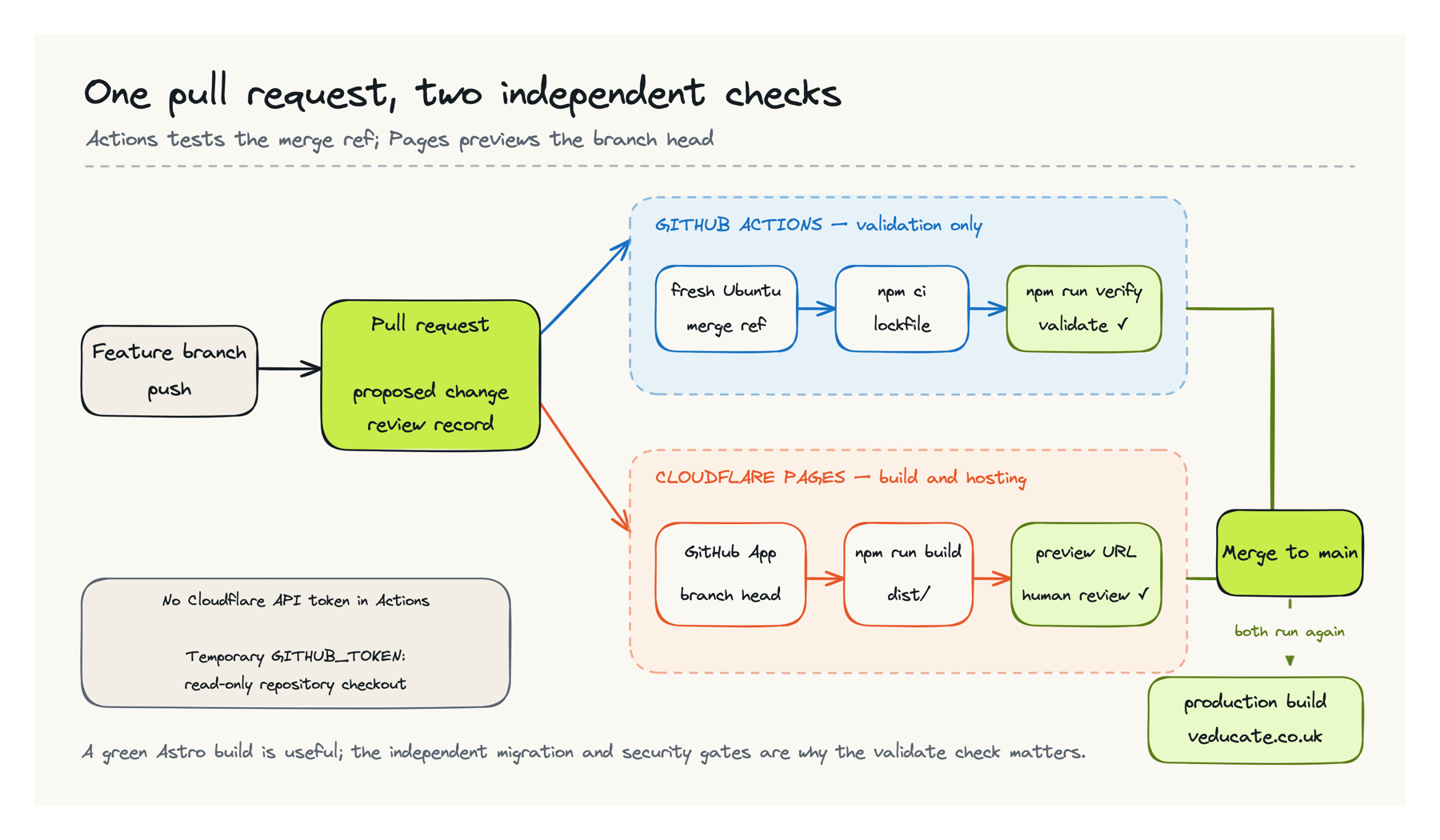
The current repository workflow is still short enough to understand rather than merely copy:
name: Validate site

on:
  pull_request:
  push:
    branches: [main]
  workflow_dispatch:

permissions:
  contents: read

jobs:
  validate:
    runs-on: ubuntu-latest
    timeout-minutes: 20
    steps:
      - name: Check out repository
        uses: actions/checkout@3d3c42e5aac5ba805825da76410c181273ba90b1 # v7.0.1
        with:
          fetch-depth: 0

      - name: Set up Python
        uses: actions/setup-python@5fda3b95a4ea91299a34e894583c3862153e4b97 # v7.0.0
        with:
          python-version: '3.13'

      - name: Set up Node.js
        uses: actions/setup-node@820762786026740c76f36085b0efc47a31fe5020 # v7.0.0
        with:
          node-version: 22
          cache: npm

      - name: Install dependencies
        run: npm ci

      - name: Enforce append-only repository data on pull requests
        if: github.event_name == 'pull_request'
        run: npm run validate:repository-data -- --baseline '${{ github.event.pull_request.base.sha }}'

      - name: Enforce append-only repository data on main
        if: github.event_name == 'push' && github.event.before != '0000000000000000000000000000000000000000'
        run: npm run validate:repository-data -- --baseline '${{ github.event.before }}'

      - name: Verify migration and production build
        run: npm run verify
Save that file as .github/workflows/ci.yml. The full-history checkout lets the append-only check compare protected operational snapshots with the pull-request base or previous main commit. A site without repository-owned historical datasets can omit those two steps, Python and fetch-depth: 0; do not add complexity that has no data contract to protect.
The @v7 and @v6 references reproduce the current repository, but major-version tags can move. For a stricter supply-chain policy, pin each action to its reviewed full commit SHA and use an automated dependency update tool to propose future SHA changes. In either case, check the current supported releases rather than assuming the versions above remain current forever.
The event behaviour matters:
- Opening a pull request starts the
validatejob. - Each additional commit pushed to that pull request starts a fresh validation run.
- A push or merge to
mainvalidates the accepted commit again. - The Run workflow control can start the same job manually through
workflow_dispatch. - A feature-branch push without an open pull request does not run this workflow, although the Pages Git integration can still create a branch preview.
permissions: contents: read gives the job only the repository access required for checkout. GitHub creates a temporary GITHUB_TOKEN for the job and expires it afterwards. There is no Cloudflare token, R2 key, deploy hook or long-lived secret in this workflow. That is especially valuable because a pull request can change the scripts that npm run verify executes.
npm ci is different from npm install: it installs the exact committed lockfile and fails when package.json and the lockfile disagree. The npm cache speeds up downloads but does not turn the runner into a trusted warm build machine. Every job still begins with a new Linux environment.
One-time GitHub configuration
For a new private repository, complete these steps once:
- Commit the workflow and confirm that Actions is enabled for the repository.
- Under Settings → Actions → General, keep the default workflow token read-only. For a validation-only repository, leave “Allow GitHub Actions to create and approve pull requests” disabled. If a separate automation genuinely needs to propose pull requests, review that grant independently and do not give the validation workflow approval or merge authority.
- Restrict allowed actions to trusted publishers where your organisation policy permits it. This workflow needs only GitHub’s
actions/checkout,actions/setup-pythonandactions/setup-nodeactions. - Open a small test pull request and confirm that both the
validatecheck and the separate Cloudflare Pages check appear and finish successfully. - If the repository plan supports rulesets or branch protection, block direct pushes to
mainand require thevalidatestatus check before merge.
If a repository cannot enforce those controls, use documented pull-request and no-force-push procedures as a temporary, weaker fallback. Record the limitation internally and do not imply that a green check is technically enforced when it is only being observed by process.
Cloudflare’s GitHub App should be authorised for only the required repository. Configure Pages with main as production, Node 22.12 or newer, the repository root, dist as the output directory and preview branches enabled. The site uses npm run build as the Pages build command; that command runs Astro and then the Node-based built-site audit, so Cloudflare rejects malformed output before upload. GitHub Actions owns the wider verification gate, including the Python-backed operational-data tests. Using npm run verify in Pages would require its build image to supply those additional Python dependencies and would duplicate work that belongs in CI.
With the native Pages integration, GitHub Actions and Cloudflare start independently after a main push; Cloudflare does not wait for the Actions result. That is another reason to prevent or procedurally forbid direct pushes. Do not add a Wrangler deploy command merely to connect the two systems unless you have deliberately chosen to replace Pages Git integration with a different deployment architecture.
Use a hosted Pages deployment as a dress rehearsal
A clean static build still needs browser review. For the initial cutover, I reviewed the production-branch build on the stable Pages project hostname before attaching the public domain. A later feature branch confirmed that Cloudflare’s Git integration also builds non-production branches at isolated preview URLs without replacing production.
For another migration, use a branch preview before cutover when the Git-integrated Pages project already exists. The important control is a hosted build that uses the same command and environment as production while the public domain still points elsewhere.
For a shareable preview, content uses the published frontmatter state on the feature branch:
status: "publish"
draft: false
It is absent from production because the branch has not been merged into main, not because the article is a draft. Cloudflare currently adds X-Robots-Tag: noindex to preview deployments by default, but that reduces accidental indexing rather than providing access control. Treat previews as public unless a signed-out test proves that an intended Cloudflare Access policy challenges the request. The stable PROJECT.pages.dev hostname is different and needs its own indexing and redirect decision after the custom domain is live; Part 5 covers that check.
My hosted-review checklist covers more than the changed article:
- Open the homepage and confirm each curated workbench has the intended latest guides, the four popularity candidates do not duplicate them, and the six recent posts do not repeat anything already shown above.
- Open
/all-posts/, the relevant category and every new tag archive. - Search using words from the title, description and taxonomy.
- Read the RSS output and sitemap, checking that they use canonical production URLs.
- Follow every internal link, image, download and series navigation link.
- Check heading order, the generated table of contents, code overflow, tables and image alternative text.
- Review wide and narrow layouts with keyboard navigation and visible focus.
- Request a deliberately unknown path and require a real 404, not a homepage disguised as success.
- Confirm canonical metadata names the production domain rather than the temporary preview hostname.
The Cloudflare Pages Astro guide documents the same npm run build command and dist output directory used here. In this repository that command adds a built-output audit after Astro finishes. Matching local, CI and hosted build settings removes a whole class of “works in one environment” problems.
Define the pre-cutover gate
I would not change DNS until all of the following are true:
- The fixed imported acceptance contract passes.
- Unit, security, schema and route checks pass.
- The production build fits the hosting limits.
- A second importer run is clean.
- A clean clone builds without private migration inputs.
- GitHub Actions passes on the candidate commit.
- The hosted Pages deployment passes the full manual review; use a branch preview when it is available before cutover.
- Redirects, sitemap, RSS, media and the 404 page have representative tests.
- A tested, time-limited rollback target is part of the cutover plan.
This is validation evidence. It tells me the new site is ready to receive traffic, but it does not tell me that traffic is actually reaching it.
After DNS changes, test the apex and www hosts, HTTP-to-HTTPS behaviour, TLS, path and query
preservation, mail records and the public sitemap. Those are verification tasks, and they are the
subject of Part 5.
Build success is one signal, not the finish line. I accepted the migration only when independent counts, relationship and security checks, a reproducible clean build, and human browser review all agreed.