
I was using WinSCP to transfer logs from a VMware CloudBuilder appliance to troubleshoot a failed lab deployment, however the files wouldn’t transfer as the user account to be used had to have root access. For this appliance, you need to elevate to root after login.
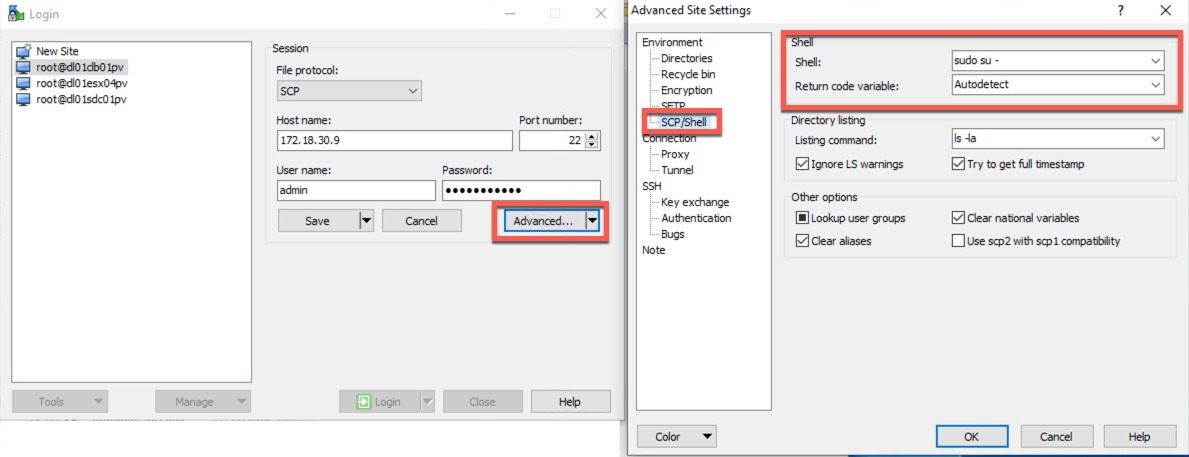
Good news, WinSCP can elevate to root after login, In your connection settings pane;
- Click Advanced
- Under “Environment” select “SCP/Shell”
- For the shell value, enter your command to elevate
- Save the configuration
When you next connect to your appliances, the command will be sent after login.
The official pages are here.
Regards
Dean
Does not work. I still get access denied
It could be your command to elevate is incorrect, or some kind of configuration of the host you are trying to connect to. Can you successfully elevate when you SSH to the host, using the same credentials.
sudo -i
Works on ptty command line in Ubuntu, but entering this same command in WinScp doesn’t work.
I don’t think
-iwill work as this is for interactive logon, you’d just need to runsuinstead to elevatedoes not work
This article is over 5 years old, I guess it’s safe to say the software behaviour has changed somewhat 😀